
Typing games
Typing Games
Short, focused games that help beginners build speed and confidence one key at a time.
Game 01 / Beginner friendly
Balloon Burst
Type rising letters and words before the balloons escape.
Play Balloon Burst →Game 02 / Word practice
Falling Words
Type falling words before they land in the garden.
Play Falling Words →Game 03 / Neon race
Turbo Type Rally
Type checkpoint words to power a night-time race.
Play Turbo Type Rally →Game 04 / Carnival fun
Carnival Shooter
Hit duck words and number targets in the shooting gallery.
Play Carnival Shooter →Game 05 / Galaxy mission
Space Typing Shooter
Type alien words to defend the galaxy with laser fire.
Play Space Typing Shooter →Game 06 / Quick reflexes
Whack-a-Mole Typing
Type a mole word before it ducks back into its burrow.
Play Whack-a-Mole Typing →Game 07 / Letter reflexes
Letter Rain
Catch colourful falling letters before they reach the grass.
Play Letter Rain →Game 08 / Recall trainer
Word Memory
Remember a set of words, then type them from memory.
Play Word Memory →Game 09 / Maze defense
Maze Word Defense
Guide your dot-eater through a maze and defeat word ghosts.
Play Maze Word Defense →More games coming
Next challenge
We are building the next fast, fun practice game now.
Play typing games that build real keyboard skills
Typing games make short practice sessions feel active, memorable, and easier to repeat. Each game on WordTypingOnline asks you to respond with letters, words, or short sequences while keeping your attention on the screen. That simple loop helps beginners connect what they see with the keys they press, improving reaction time, accuracy, and keyboard confidence without turning practice into a long worksheet. You can start with Balloon Burst for gentle letter practice, move to Falling Words for quick word recognition, or try a timed typing practice session when you want a quieter drill.
These free online typing games are designed for short, useful breaks: play one round, notice where you hesitate, and play again with a clearer goal. Students can use them to become more comfortable with the keyboard, teachers can use them as a quick warm-up, and adults can use them to refresh typing skills between longer tasks. When you want to measure what the games are improving, take a typing test or use the WPM calculator to understand speed in words per minute.
How typing games build skills
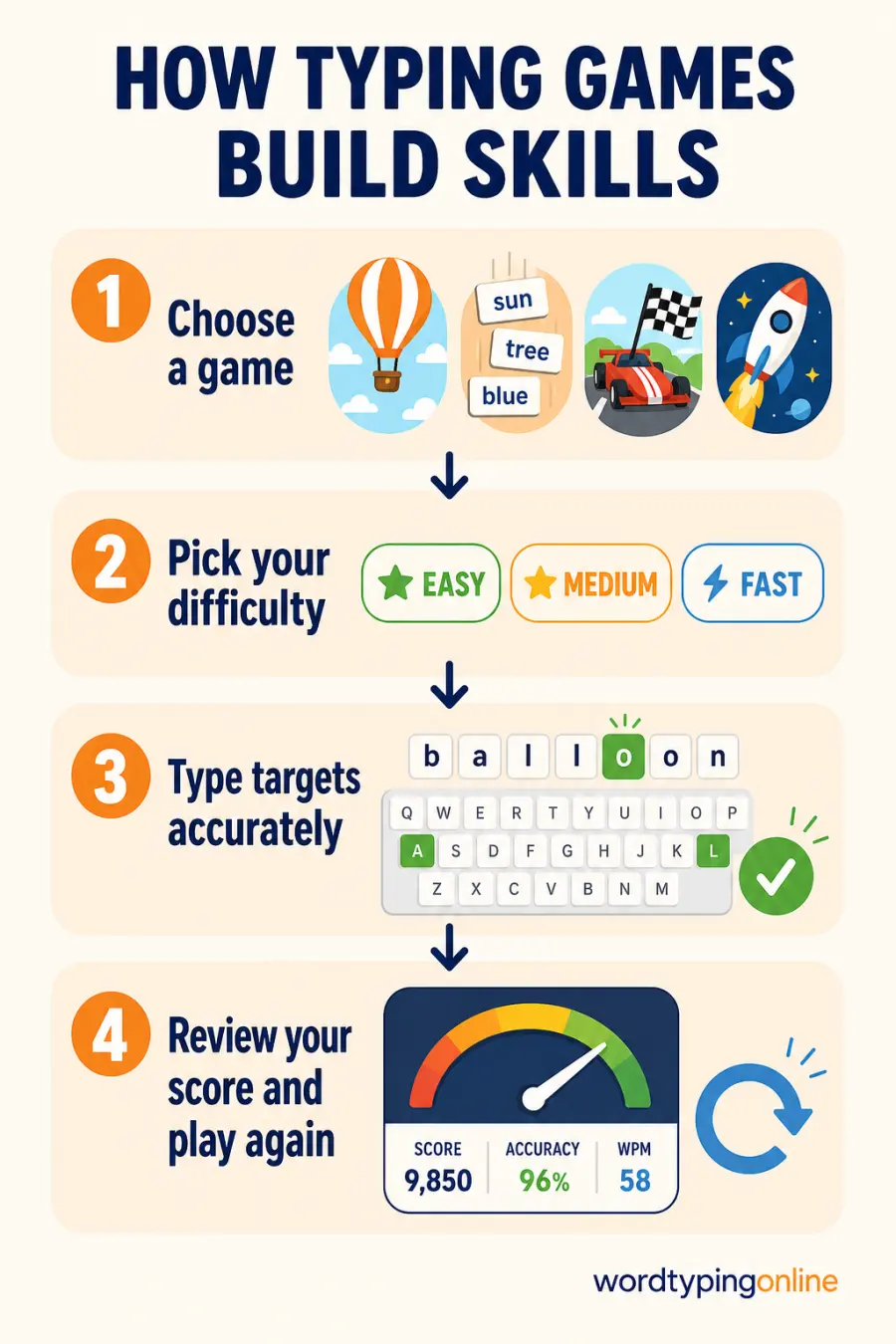
Quick facts
- Estimated round: 1 to 2 minutes
- Best for: beginners through developing typists
- Practice focus: letters, words, reactions, and accuracy
Who should use typing games?
Children, students, new typists, teachers, parents, and anyone who learns better through short interactive challenges can use these games. Start with the difficulty that keeps you accurate, then move up gradually.
What are typing games?
Typing games are interactive keyboard activities that turn common typing actions into a goal, challenge, or story. Instead of copying a long paragraph, you may pop a balloon, catch a falling word, move through a race, defend a maze, or remember a set of words. The learning value comes from the same foundation each time: see the target, locate the correct keys, type accurately, and receive immediate feedback.
Different game styles train slightly different skills. Letter Rain develops single-key recognition and fast reactions. Word Memory encourages recall before typing. Maze Word Defense adds attention and decision-making, while Space Typing Shooter rewards accurate word completion. Together, they give learners more than one way to practise the same essential keyboard habits.
Why choose these online typing games?
- They begin quickly in the browser, with no download or complex setup.
- Short rounds make it easy to practise consistently, even when you only have a few minutes.
- Easy, Medium, and Fast levels let you choose a pace that matches your current skill.
- Live score, accuracy, lives, and combo feedback show how each round is going.
- Every game has a different visual challenge, so practice stays varied while the keyboard skill remains useful.
- Approved community scores create a friendly goal without replacing personal progress.
How do typing games help you improve?
Improve key recognition
Fast visual prompts help you notice a letter or word and find it on the keyboard with less searching.
Protect accuracy
Correct targets build a score and combo, encouraging calm, deliberate keystrokes rather than random rushing.
Build consistency
Repeating small challenges develops the reliable rhythm that supports longer writing and timed tests.
Choose a game for your goal
Choose Balloon Burst when you are beginning with individual letters and want a bright, calm challenge. Choose Falling Words when you want to read and type short words before they reach the ground. Choose Turbo Type Rally when you enjoy a friendly race and want each completed word to move your car forward. Carnival Shooter mixes words and number targets, and Whack-a-Mole Typing turns quick word recognition into short reaction drills.
For a more focused challenge, Space Typing Shooter uses alien words and laser feedback; Letter Rain adds falling characters and progressive levels; Word Memory asks you to remember words before typing them; and Maze Word Defense adds direction and timing. There is no need to master every game at once. Play the one that feels engaging, then return to the typing lessons or practice page when you want to isolate a particular skill.
How to get better results from a game round?
- Choose Easy for your first round so you can learn the game pattern without pressure.
- Keep your eyes on the target, not on every key. Brief glances at the keyboard are normal for beginners.
- Type accurately before trying to type faster; one clean response is more useful than several rushed mistakes.
- Use a short break after a difficult round, then replay at the same level or one level lower.
- After two or three rounds, use a typing test or practice drill to apply the same accuracy to longer text.
Difficulty levels and recommended grades
Easy mode is suitable for early learners, younger children, and anyone still becoming familiar with letter positions. Medium mode is useful once short targets feel comfortable and you want a steadier pace. Fast mode raises the challenge with quicker movement, more targets, or harder recall; it is best for confident learners who can stay accurate under time pressure. In school settings, younger grades often benefit from Easy mode, while upper elementary, middle school, high school, and adult learners can choose Medium or Fast according to comfort—not age alone.
Tips and common mistakes to avoid
- Do not move to Fast mode just because it is available; move up when Easy or Medium feels consistently accurate.
- Avoid chasing a high score by guessing. Correct key presses teach more useful habits than random inputs.
- Keep sessions short enough that your shoulders and hands remain relaxed.
- Use a physical keyboard when available, especially for touch-typing practice on a tablet or laptop.
- Do not compare every score with another player. Compare your own accuracy and score over several sessions instead.
Supported devices and browsers
These browser typing games work in current versions of Chrome, Edge, Firefox, Safari, and other modern browsers. Desktop and laptop computers provide the largest playing area and the most comfortable physical keyboard setup. Tablets and phones are supported as well; use the on-screen keyboard or a connected keyboard, and rotate your device if that gives you more room. For best results on mobile, begin the game while the canvas is visible and allow the keyboard to appear before typing.
Frequently asked questions
Are these typing games free?
Yes. You can play the available games for free in your browser.
Do I need an account to play?
No. Guests can play immediately. An account is helpful later for saved progress and other member features.
Which typing game is best for beginners?
Balloon Burst and Letter Rain are good starting points because they focus on simple letter recognition and short reactions.
Can children use these games?
Yes. Start with Easy mode and short rounds, then increase difficulty only when the child is comfortable.
Do typing games improve typing speed?
They can improve key recognition, reaction time, and accuracy. Combine them with lessons and regular typing practice for the greatest overall improvement.
Can I play on a phone or tablet?
Yes. Modern mobile browsers are supported, and a connected physical keyboard can make longer rounds more comfortable.
What happens to game scores?
High scores may be submitted for review. Approved scores can appear on the relevant game leaderboard.
Should I use games instead of typing lessons?
Use both. Lessons teach technique, while games give you an engaging way to repeat and apply those skills.
Ready for your next typing challenge?
Pick a game for a quick practice round, then use a lesson, typing practice drill, or live test to keep your progress moving.
Play Balloon Burst · Try Letter Rain · Explore typing practice · Start typing lessons · Take a typing test