
Typing game · Beginner friendly
Balloon Burst Typing Game
Type the letters or words on rising balloons before they float away.
Ready to play?
Pop the balloons
Type the matching letters or words before they float away.
Round complete!
Escape pauses or resumes the game. The balloons speed up every 15 seconds. Reach the Top 50 to submit your name for public review.
Community scores
Balloon Burst leaderboard
Approved scores only. Select a level to see its Top 10.
Balloon Burst Typing Game: playful letter practice for beginners
Balloon Burst is a free browser typing game that turns short keyboard practice into a quick, colourful challenge. Type the letters and words shown on rising balloons before they float away. It is designed to help beginners notice the next character, press the matching key, and keep moving without the pressure of a long formal test. Use it as a light warm-up before a typing test, as a break between typing practice drills, or as a fun way to make regular keyboard practice feel less repetitive.
Each round gives immediate feedback through score, accuracy, lives, and combo information. That makes Balloon Burst useful for children, new typists, students, and anyone rebuilding confidence on a keyboard. You can begin as a guest, select a difficulty level, and return whenever you want another short practice session.
Quick facts
- Estimated session: about 1 to 3 minutes.
- Practice focus: letters, short words, timing, and accuracy.
- Works in current desktop, tablet, and mobile browsers.
Who should play?
Balloon Burst is a comfortable starting point for early learners, Grades 1 to 5, parents practising with children, teachers planning a short keyboard activity, and adults who prefer a friendly first step before timed typing tests.
What is the Balloon Burst typing game?
Balloon Burst is an educational typing game where targets rise across the screen. Your job is simple: see the letter or word, type it correctly, and pop the balloon before it escapes. The simple rule gives you repeated practice with visual scanning, key recognition, and quick reaction time. Unlike a long paragraph, each target is a small, manageable success, so learners can focus on one response at a time.
How Balloon Burst game work?
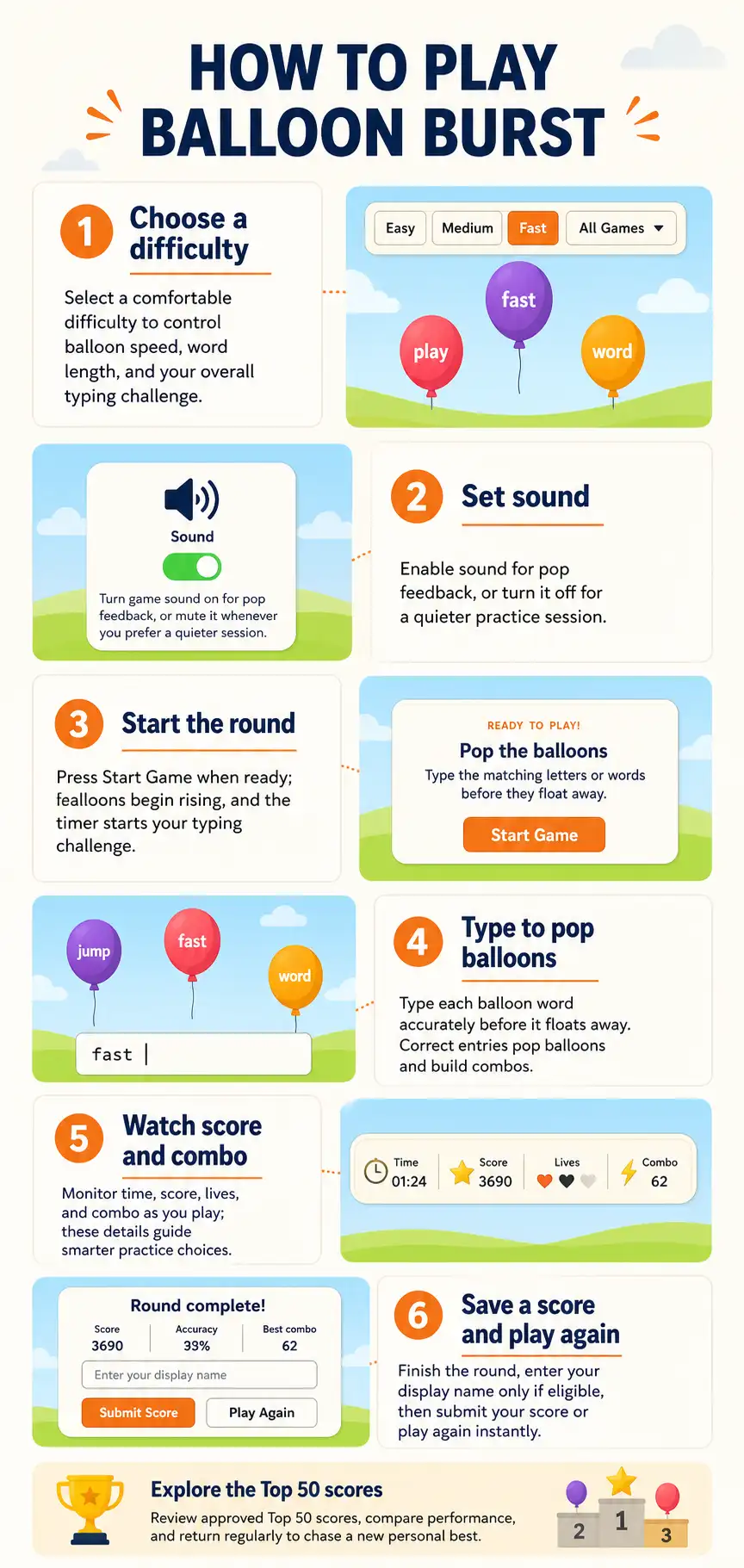
- Choose Easy, Medium, or Fast.
- Start the round and watch the balloons rise.
- Type the matching letter or word before its balloon leaves the play area.
- Build a combo by responding accurately and use the result to choose your next practice goal.
The pace increases as the round continues, so the game gradually asks you to recognise targets faster. If you want more structured keyboard drills after playing, continue with typing lessons. If you prefer another fast visual challenge, try Letter Rain or browse all typing games.
Why choose Balloon Burst for typing practice?
- Short, focused rounds: a practical way to practise when you only have a few minutes.
- Live feedback: score, accuracy, lives, and combos make improvement easy to notice.
- Beginner-friendly pacing: start slowly, then choose a more demanding mode when you are ready.
- Low-pressure repetition: repeated letter and word recognition can support keyboard familiarity and muscle memory.
- Free browser play: no download is required for a quick session.
How does this game help you improve?
Improve recognition
Looking from the balloon to the keyboard trains you to identify the next character quickly rather than guessing.
Build accuracy first
Correct responses matter more than rushing. A steady, accurate rhythm is a stronger base for faster typing later.
Track progress
Repeat the same level and compare your score, accuracy, and combo over several short sessions.
Difficulty levels, lives, and progression
Easy mode is best for learning the flow of the game and practising individual letters at a calmer pace. Medium mode asks for quicker recognition and a more consistent response. Fast mode is for players who are ready for more frequent targets and want to test concentration under time pressure. Lives give the round a clear objective: missed balloons reduce your room for error, while accurate typing helps you keep the run going. Start at the level that lets you remain relaxed and accurate, then move up only when your current level feels dependable.
Tips for a better Balloon Burst score
- Keep your eyes on the next balloon and avoid looking for several targets at once.
- Use a light touch and return your fingers to a comfortable home position after each response.
- Choose Easy when accuracy is below your goal; speed improves more reliably after accuracy becomes consistent.
- Pause between rounds instead of forcing tired hands through repeated mistakes.
- Use a physical keyboard on desktop or tablet when possible for the most direct key feedback.
See Balloon Burst in action
Leaderboard and community scores
Strong qualifying scores can be submitted with a display name for review. Approved scores may appear on the Balloon Burst community leaderboard, which keeps public rankings useful and moderated. Your best next step is not always to chase the highest score immediately. First aim for clean, repeatable accuracy, then increase difficulty when your results become consistent.
Supported devices and browsers
Balloon Burst works in current versions of Chrome, Edge, Firefox, Safari, and other modern browsers. You can play on desktop, laptop, tablet, or phone. A physical keyboard gives the best typing-practice experience, while supported on-screen keyboard input can be used on touch devices. For a quick speed estimate after a game, use the free WPM Calculator.
Frequently asked questions
Is Balloon Burst free to play?
Yes. Balloon Burst is free to play in your browser, and you can start a round without creating an account.
Is Balloon Burst good for beginners?
Yes. Easy mode uses a calm, visual format that helps beginners practise recognising letters and responding to one target at a time.
How does Balloon Burst improve typing?
It gives repeated practice with seeing a character, finding its key, and pressing it accurately before a target disappears.
Can I play Balloon Burst on a phone or tablet?
Yes. The game supports modern mobile and tablet browsers, although a physical keyboard is usually more comfortable for longer practice.
What do Easy, Medium, and Fast change?
The levels change the pace and challenge of the targets. Start with the level that lets you stay accurate, then progress gradually.
What happens when I miss a balloon?
Missing targets affects your lives and can end the round sooner, so accurate typing is more useful than uncontrolled speed.
How do Balloon Burst leaderboard scores work?
Eligible scores can be submitted with a display name. Public leaderboard entries are reviewed before approval.
Do I need an account to play?
No. You can play as a guest. An account is useful when you want access to account-based features elsewhere on WordTypingOnline.
Ready to pop your next target?
Use Balloon Burst for a short accuracy warm-up, then continue your learning with a typing test, focused practice, lessons, or another beginner-friendly game.
Start a free typing test · Explore typing practice · Try typing lessons · Discover more games