
Typing game · Carnival fun
Carnival Shooter Typing Game
Type the moving target words before they race across the shooting gallery.
Ready, aim, type!
Hit the word targets
Type each target word before it gets away.
Gallery round complete!
Escape pauses or resumes the game. Targets move faster every 15 seconds. Reach the Top 50 to submit your name for public review.
Community scores
Carnival Shooter leaderboard
Approved scores only. Select a level to see its Top 10.
A fast, playful typing challenge at the carnival
Carnival Shooter Typing Game turns quick keyboard practice into a colourful shooting-gallery challenge. Type the word under a duck or the number inside a target before it moves away. Every correct answer earns points, protects your lives, and helps you build a better rhythm without turning practice into a boring worksheet. It is a free online typing game for short, focused sessions at home, in class, or between longer practice drills.
Use this game when you want lively word practice with instant feedback. After a few rounds, continue with typing practice for focused drills, build accuracy through typing lessons, or compare your speed in the free typing test. You can also explore more beginner-friendly challenges in our typing games collection.
What is Carnival Shooter Typing Game?
Carnival Shooter is an educational arcade typing game. Ducks carrying short words and target boards carrying numbers appear across the gallery. Your job is to read the target, type it correctly, and clear it before it disappears. The game rewards accurate responses instead of random key pressing, so each round gives you a practical way to strengthen recognition, reaction time, and keyboard confidence.
The carnival theme makes the task feel light and approachable for children, students, and adults. It is especially useful when a learner needs a change from standard word lists but still wants meaningful typing practice. The targets move gradually at first and become more demanding as the round progresses.
How does the Carnival Shooter game work?
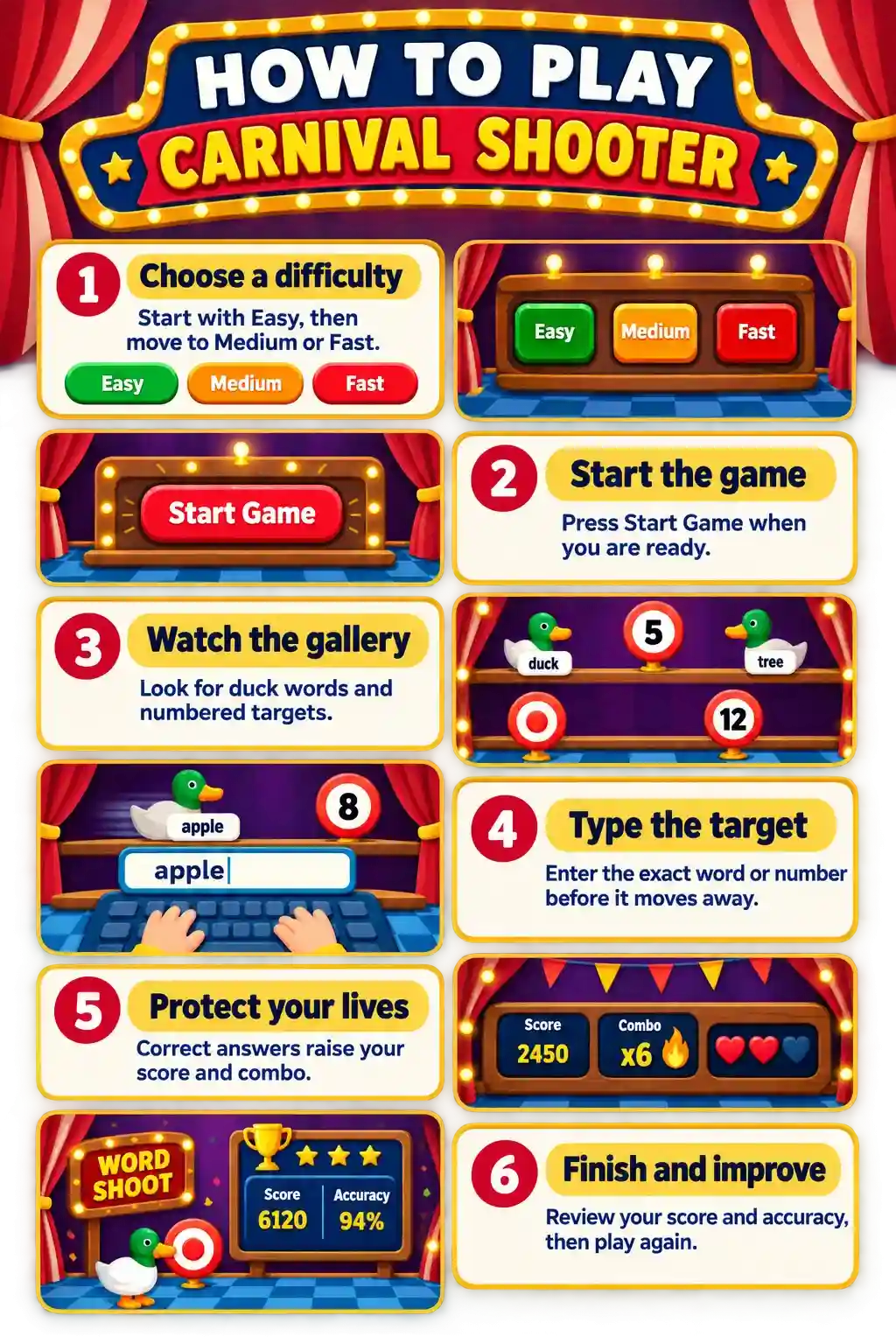
- Choose Easy, Medium, or Fast mode before starting a round.
- Watch the shooting gallery for duck words and numbered targets.
- Type the exact word or number shown on a target to clear it and earn points.
- Keep your accuracy high to protect your lives and extend your combo.
- Finish the round, review your score, and submit a qualifying result for leaderboard review.
Carnival Shooter at a glance
Why choose Carnival Shooter for typing practice?
This game is designed for people who learn best through short bursts of action. It combines word recognition, number-key awareness, visual scanning, and careful typing in one simple activity. Because targets arrive in different positions, you practise finding the next item quickly rather than relying on a fixed line of text.
- Quick feedback: correct targets clear immediately, so you know whether your response worked.
- Balanced practice: words and numbers encourage flexible keyboard use.
- Short rounds: a useful option for warm-ups, classroom breaks, or daily typing habits.
- Motivating progression: score, combo, lives, and difficulty give each attempt a clear goal.
Who should play this typing game?
Carnival Shooter works well for beginners who already know basic keys, students practising spelling and number entry, teachers looking for a quick classroom activity, and adults who want a more playful typing break. Younger learners can begin with Easy mode, while faster typists can use Medium or Fast mode to practise decision-making under gentle pressure. The best approach is to choose the setting that lets you stay accurate while still feeling challenged.
Difficulty modes, lives, and progression
Easy mode
Easy mode gives you more time to notice each target and type it calmly. It is recommended for new typists, younger grades, and players who want to learn the game controls.
Medium mode
Medium mode adds a quicker pace and asks you to keep your eyes moving across the full gallery. It is a good next step once easy targets feel predictable.
Fast mode
Fast mode is for confident players who can read, decide, and type without losing accuracy. Speed increases through the round, so stay relaxed and prioritise clean keystrokes.
You begin with a limited number of lives. Missing a target can cost a life, while consecutive correct answers increase your combo. This small amount of pressure helps you practise recovery: pause briefly, find the next target, and return to a steady pace instead of rushing.
How does this game help you improve?
- Improve response speed: practise reading and typing short targets without hesitation.
- Increase accuracy: targets only clear when the entry matches, reinforcing careful spelling.
- Build number-key confidence: numbered targets provide a friendly introduction to digit entry.
- Develop visual focus: scanning the gallery trains you to find the next task quickly.
- Track progress: compare scores and accuracy over several sessions rather than judging one round alone.
Tips for a higher Carnival Shooter score
- Read the complete target before pressing the first key.
- Keep your fingers near the home row so you can return to a comfortable position.
- Use a level where you can stay accurate; moving up too early often lowers your score.
- For number targets, glance at the digits once, then type with a deliberate rhythm.
- Take a short break if your accuracy starts falling, then come back for another round.
Leaderboard, supported devices, and browsers
Top qualifying game scores can be submitted for review. Approved scores appear on the public game leaderboard, which keeps rankings useful and fair for the community. You can play Carnival Shooter in current versions of Chrome, Edge, Firefox, Safari, and other modern browsers. It works on desktop, laptop, tablet, and supported mobile devices; a physical keyboard usually offers the most comfortable experience for longer rounds.
Frequently asked questions
Is Carnival Shooter Typing Game free?
Yes. You can play Carnival Shooter for free in a modern web browser.
How do I score points?
Type the word under a duck or the number on a target correctly before it disappears.
What should beginners choose?
Start with Easy mode and move up only when you can keep a comfortable, accurate pace.
Does the game include number typing?
Yes. Numbered target boards appear alongside word targets, giving you a light number-entry challenge.
Can Carnival Shooter improve typing speed?
It can help you practise quick recognition, accurate short entries, and a steadier response rhythm.
Can I play on a phone or tablet?
Yes, on supported mobile browsers. A hardware keyboard is recommended when available.
How does the leaderboard work?
Qualifying scores can be submitted for review, and approved results are displayed publicly for that game and difficulty.
Do I need an account to play?
No. Guests can start playing right away; an account adds saved progress and other account features.
Ready to take aim?
Play a Carnival Shooter round, then use your result to choose the next typing challenge that fits your goal.
Play Carnival Shooter · Explore all typing games · Try typing practice · Build skills with lessons