
Typing game · Letter explorer
Letter Rain Typing Game
Catch the colourful falling letters before they reach the grass
Ready to catch?
Catch the letter rain
Press the matching key before each letter reaches the grass. Every five catches unlocks a faster level.
Great job!
Escape pauses or resumes the game. Every five catches unlock a new level. Reach the Top 50 to submit your name for public review.
Community scores
Letter Rain leaderboard
Approved scores only. Select a level to see its Top 10.
Build quick key recognition with Letter Rain
Letter Rain is a free typing game that turns keyboard practice into a fast, colourful reaction challenge. Catch each falling letter before it reaches the grass, build your score, and watch each successful group of catches unlock a new level. It is an engaging way for children, beginners, students, and anyone refreshing their keyboard skills to practise letter recognition without a long typing test.
Use Letter Rain for a short warm-up before a typing test, after a focused typing lesson, or between longer typing practice sessions. The game is designed around one clear habit: see the character, find the key, and press it accurately before time runs out.
Quick facts
- Estimated round: about 1 minute
- Focus: letter keys, reactions, and accuracy
- Works on desktop, tablet, and mobile
Who should play?
Early learners, K–5 students, parents, teachers, and beginner typists can use Letter Rain to practise letter keys in a short, colourful, low-pressure format.
What is the Letter Rain Typing Game?
Letter Rain is a browser-based educational typing game. Letters fall through a moving sky scene, and the player presses the matching key before each letter reaches the ground. Every correct catch adds to the score and helps build a combo. Missed letters reduce lives, so accuracy matters as much as speed.
Unlike a full paragraph typing exercise, this game keeps attention on individual keys. That makes it useful when a learner is still becoming comfortable with the keyboard layout, when a teacher needs a quick classroom activity, or when a more experienced typist wants a playful reaction-speed drill. For word-based practice, continue with Falling Words; for a memory challenge, try Word Memory.
How does Letter Rain work?
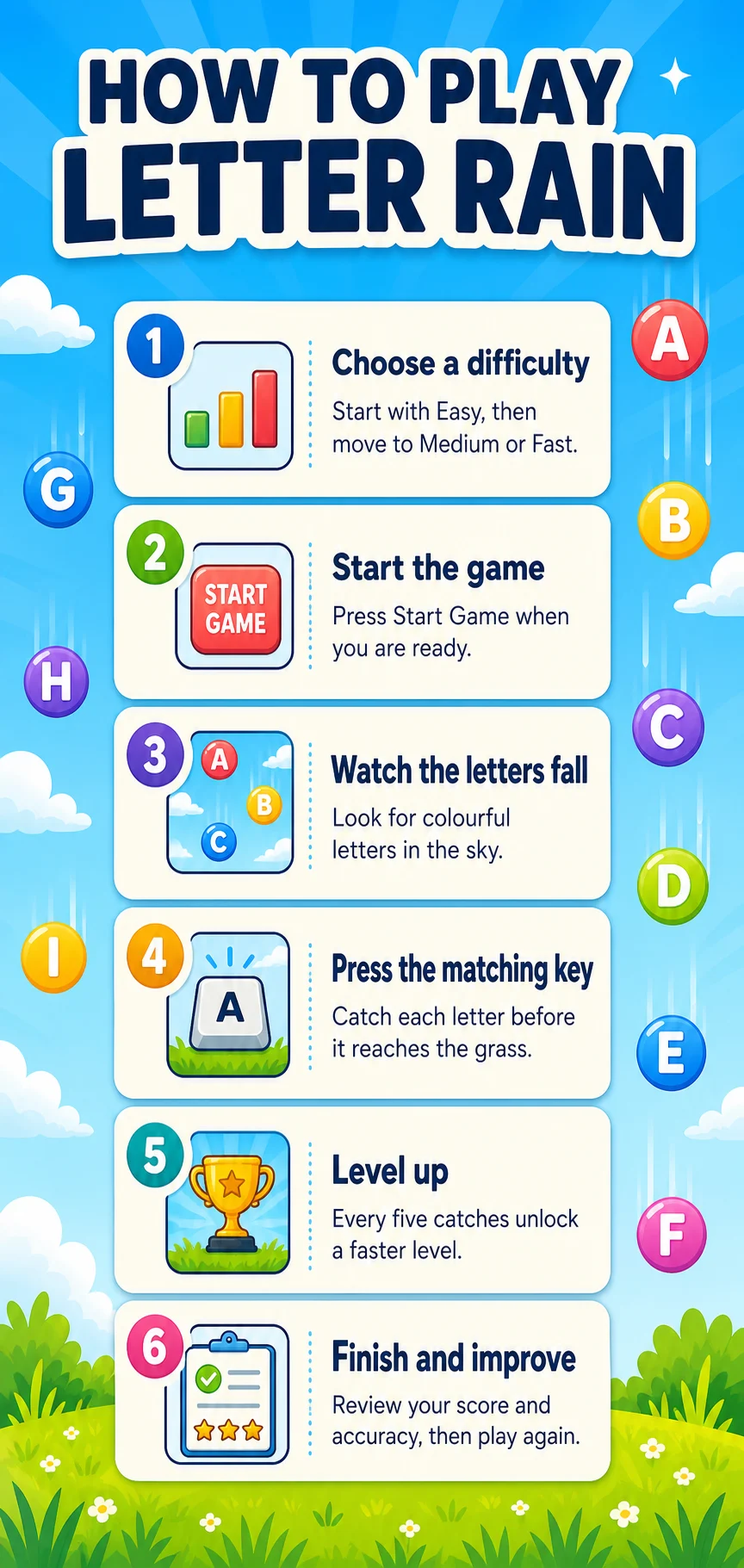
- Select Easy, Medium, or Fast before starting a round.
- Watch the falling letter and press the matching keyboard key.
- Correct catches increase score and combo while missed letters cost a life.
- Every five successful catches introduces another level and a slightly quicker pace.
- Finish the round, review your result, and submit a qualifying score for review.
The level system gives beginners a gentle starting point while still rewarding improvement. Easy mode gives more time to react. Medium mode asks for steadier recognition. Fast mode may include number keys as well as letters, making it a useful next step once the alphabet row feels comfortable.
Letter Rain at a glance
Why choose Letter Rain for typing practice?
- Short rounds make daily typing practice easier to keep consistent.
- Falling characters train visual attention and fast keyboard recall.
- Levels make progress visible without requiring complicated setup.
- Lives encourage deliberate key presses instead of random guessing.
- The game works as a fun bridge between lessons, practice drills, and typing games.
People often improve typing speed by repeating accurate movements, not by rushing. Letter Rain helps create that foundation: identify the character, reach for the correct key, and repeat. Pair the game with the typing lessons to learn finger placement, then use the practice tool to apply the same accuracy to words and sentences.
Difficulty levels, lives, and progression
Easy
Easy mode is best for children and new typists. Letters fall slowly enough to locate the key without panic, making it ideal for learning letter positions and building confidence.
Medium
Medium mode increases the pace for learners who already know most letter keys. It encourages quicker reactions while keeping the game approachable.
Fast
Fast mode is a sharper keyboard challenge. Characters fall more quickly, and numbers can appear, so players must keep looking ahead and respond with control.
You begin with lives and try to protect them through accurate catches. A missed letter provides feedback and moves the round closer to completion. Reaching a new level after a group of successful catches creates a clear sense of progress and keeps the game motivating.
How does this game help you improve?
Recognise keys faster
Repeatedly matching a visible letter to a keyboard key improves recognition and reduces hesitation.
Protect accuracy
Lives and missed-letter feedback remind players that correct input matters before speed.
Build confidence
Small levels and short sessions let learners experience steady success one key at a time.
Why children, parents, and teachers like Letter Rain?
Children get an approachable arcade-style challenge, while parents and teachers get a simple way to practise key recognition. It works well before a home-row lesson, as a short classroom warm-up, or as a break between focused drills. For a different kind of beginner challenge, explore Balloon Burst or browse all typing games.
Tips to beat your high score
- Use a physical keyboard when possible for the most natural response.
- Keep eyes on the falling letters instead of watching your hands.
- Start on Easy and raise the difficulty only when accuracy stays comfortable.
- Press one matching key at a time; guessing quickly usually costs more lives.
- Take a short break after a difficult round, then replay with a calm rhythm.
Supported devices and browsers
Qualifying Letter Rain scores can be submitted for review, and approved scores appear on the relevant leaderboard. You can play as a guest, while an account helps connect your wider progress. Letter Rain supports current versions of Chrome, Edge, Firefox, Safari, and other modern browsers on desktop, laptop, tablet, and phone. For another beginner-friendly reaction game, explore Balloon Burst or compare results on the typing leaderboards.
Frequently asked questions
Is Letter Rain free to play?
Yes. You can play Letter Rain free in a supported web browser.
What ages is Letter Rain for?
It is especially useful for early learners and K–5 students, though any beginner who wants faster letter recognition can play.
How do I play Letter Rain?
Start a round, then press each matching key before the falling letter reaches the ground.
What is the best mode for beginners?
Easy mode is the best starting point because it gives more time to recognise and press each letter.
Does Fast mode include numbers?
Yes. Fast mode can include number keys as an additional challenge.
Can Letter Rain help children learn typing?
Yes. Its short rounds and single-letter focus make it useful for young learners building keyboard familiarity.
Can I play on a phone or tablet?
Yes. The game works in modern mobile browsers, although a physical keyboard can be more comfortable for longer play.
What happens if I miss a letter?
A missed letter costs one life. Use the result screen to review your score and try another round.
Do I need an account to play?
No. Guests can start immediately. An account adds saved progress and related account features.
How does the leaderboard work?
Qualifying scores may be submitted for review. Approved scores appear publicly for the selected difficulty.
Can I save a high score?
If a score qualifies for the Top 50, you can submit a display name for administrator review.
Ready to catch the next letter?
Play a quick Letter Rain round, then continue building control with a lesson, practice drill, or live typing test.
Play Letter Rain · Explore all typing games · Try typing lessons · Start typing practice · Take a typing test