
Typing game · Word practice
Falling Words Typing Game
Catch the falling words before they reach the garden path.
Ready to catch?
Save the garden
Type every falling word before it lands.
Garden round complete!
Escape pauses or resumes the game. The words speed up every 15 seconds. Reach the Top 50 to submit your name for public review.
Community scores
Falling Words leaderboard
Approved scores only. Select a level to see its Top 10.
Falling Words Typing Game: practise speed, one word at a time
Falling Words is a free online typing game that turns short word practice into a quick challenge. Type each word before it reaches the bottom of the screen, then use the next round to improve your focus, typing speed, and accuracy. It is a simple place to begin when you want a more active alternative to a regular typing practice session or a short warm-up before taking a typing test.
Every word gives you a clear reason to look ahead, recognise letter patterns, and type with control. That makes Falling Words useful for beginners building confidence, students practising keyboard skills, and experienced typists who want a fast daily drill. If you are learning key positions for the first time, combine this game with our guided typing lessons to build stronger muscle memory.
Quick facts
- Estimated session: 1 to 3 minutes
- Focus: word recognition, speed, accuracy, and attention
- Modes: Easy, Medium, and Fast
- Works on desktop, tablet, and supported mobile browsers
Who should use it?
Students, teachers, children, job candidates, and anyone who wants a short typing speed game can use Falling Words. It is especially useful when you need a focused practice break without setting up a long exercise.
What is Falling Words?
Falling Words is an educational typing game in which words move down the game area, and you type them before they land. The goal is not only to react quickly. You also need to read the entire word, choose the correct keys, and keep your hands relaxed while the pace changes. This repeated cycle helps make familiar word shapes easier to recognise during future typing tasks.
What is new in this typing game?
Falling Words includes clear Easy, Medium, and Fast modes, live score feedback, sound controls, a round-complete summary, and community score rankings. The game is designed to stay lightweight and responsive, so you can return for short practice rounds on a desktop, tablet, or supported phone browser. Your selected level changes the challenge without changing the simple goal: type the word before it falls away.
How Falling Words works?
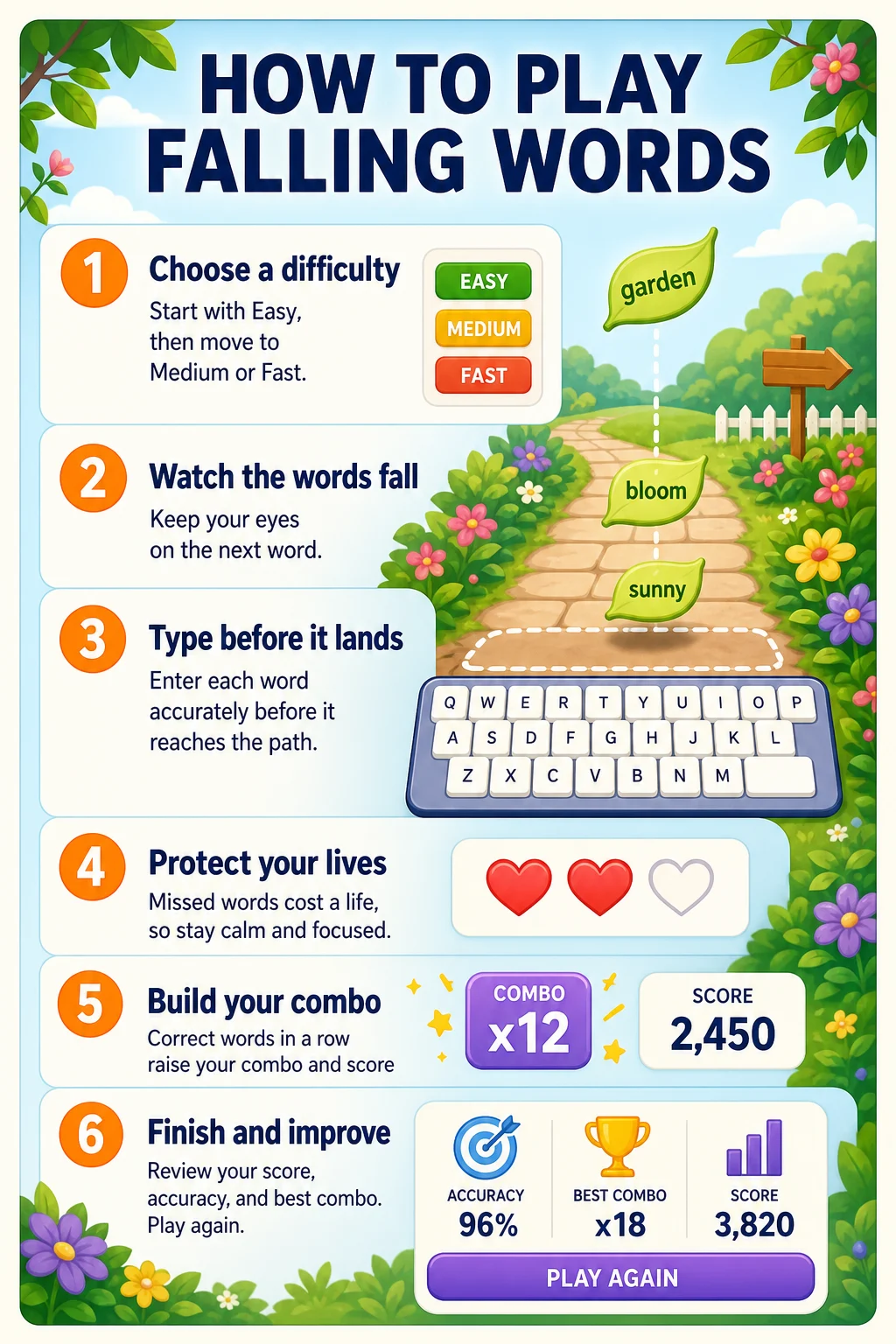
- Choose Easy, Medium, or Fast before starting a round.
- Watch the falling words and identify the next word you want to type.
- Type the matching letters in order before the word reaches the bottom.
- Use your score, accuracy, lives, and combo feedback to guide the next round.
How to play the Falling Words game?
Start on Easy if you are new to online typing games or want to practise calm, accurate keystrokes. Keep your eyes on the next falling word instead of looking down at the keyboard. Type steadily rather than rushing through the first letters. When you are comfortable, move to Medium and then Fast to practise faster recognition and reaction time. A physical keyboard gives the best experience, but touch keyboard input is supported on compatible mobile devices.
How Falling Words works at a glance?
Why choose Falling Words for typing practice?
Short games make it easier to practise regularly. Falling Words gives you an immediate target, so there is less time to lose focus or overthink each keystroke. The visual movement encourages you to scan ahead, while the scoring feedback shows why accuracy matters as much as speed. After a round, you can compare your result with a WPM calculator, continue with a focused text drill, or explore more beginner-friendly challenges in our typing games collection.
How does this game help you improve?
Improve WPM
Repeated short rounds help you practise faster word recognition and smoother keystrokes.
Protect accuracy
Words that arrive one at a time reward careful spelling instead of random fast typing.
Build focus
The moving target keeps your attention on the current word and the next decision.
Difficulty levels, lives, and progression
Easy mode is ideal for younger learners and anyone building keyboard confidence. Medium adds a quicker pace once you can type common words without hesitation. Fast mode is for players who want a sharper reaction challenge and a more demanding typing speed practice game. Each level still rewards clean typing. If you lose a life, use it as a reminder to slow down just enough to read the full word before pressing the first key.
Tips and common mistakes to avoid
- Read the whole word before typing so you do not guess from its first letter.
- Prioritise accuracy first; repeated errors can teach the wrong finger movement.
- Do not stare at one missed word when another reachable word is already on screen.
- Use short rounds, then take a brief break if your hands or eyes start to feel tired.
- Increase the level gradually instead of treating Fast mode as the only measure of progress.
Compete, learn, and return for a new high score
Eligible high scores can appear in the game leaderboard after review, giving returning players a reason to improve without turning every round into pressure. Visit the site-wide typing leaderboards to see public performance rankings, or choose another game when you want to practise a different skill. A few accurate Falling Words rounds before school, work, or a formal typing test can become a useful daily habit.
Add your Falling Words screenshots
Add three screenshots below this section in the Gutenberg editor: one showing the level selector, one showing words falling during play, and one showing the round-complete score card. Use descriptive image alt text such as “Falling Words typing game with words descending on screen” so readers and search engines understand what each image demonstrates.
Supported devices and browsers
Falling Words works in current versions of Chrome, Edge, Firefox, Safari, and other modern browsers. It is available on desktop, laptop, tablet, and supported mobile devices. For the clearest gameplay and fastest responses, use a physical keyboard where possible. On phones and tablets, make sure the on-screen keyboard is open before typing.
Frequently asked questions
Is Falling Words free to play?
Yes. Falling Words is free to play in a modern web browser.
How does Falling Words improve typing speed?
It trains you to recognise words quickly, type them in order, and make faster decisions while protecting accuracy.
Which difficulty should beginners choose?
Beginners should start with Easy mode, then move to Medium after they can complete rounds accurately.
What happens when a word reaches the bottom?
A missed word can cost a life, so keep watching the next word and continue with the round.
Can children and students play Falling Words?
Yes. The game is designed as a simple, beginner-friendly typing activity for learners, students, and families.
Does Falling Words work on phones and tablets?
Yes, on supported devices and browsers. A physical keyboard usually provides the most comfortable experience.
Do I need an account to play?
No. Guests can play immediately, while registered users can use account features where available.
How do Falling Words leaderboard scores work?
Top qualifying scores can be submitted for review, and approved public scores appear in the relevant game leaderboard.
Ready for another typing challenge?
Build your next skill with a speed test, structured practice, guided lessons, or another quick typing game.
Start a free typing test · Explore typing practice · Try typing lessons · Discover more games