
Mechanical switch diagnostic
Keyboard Switch Tester
Press and release keys to inspect local switch events and spot unexpected double registration.
Live switch events
Press a key to test its switch
Switch event log
0 events- Press a key to begin a local switch check.
What’s new in Keyboard Switch Tester?
Keyboard Switch Tester records local press and release events for individual keys and highlights possible double registration. First confirm normal browser registration with Keyboard Tester, then compare feedback consistency with the Keyboard Latency Test.
What is a keyboard switch tester?
A switch tester helps you observe the events a browser receives from one key over repeated presses. It is useful when a mechanical switch feels inconsistent, sticky, or likely to chatter. It cannot measure physical actuation force or diagnose every internal hardware fault.
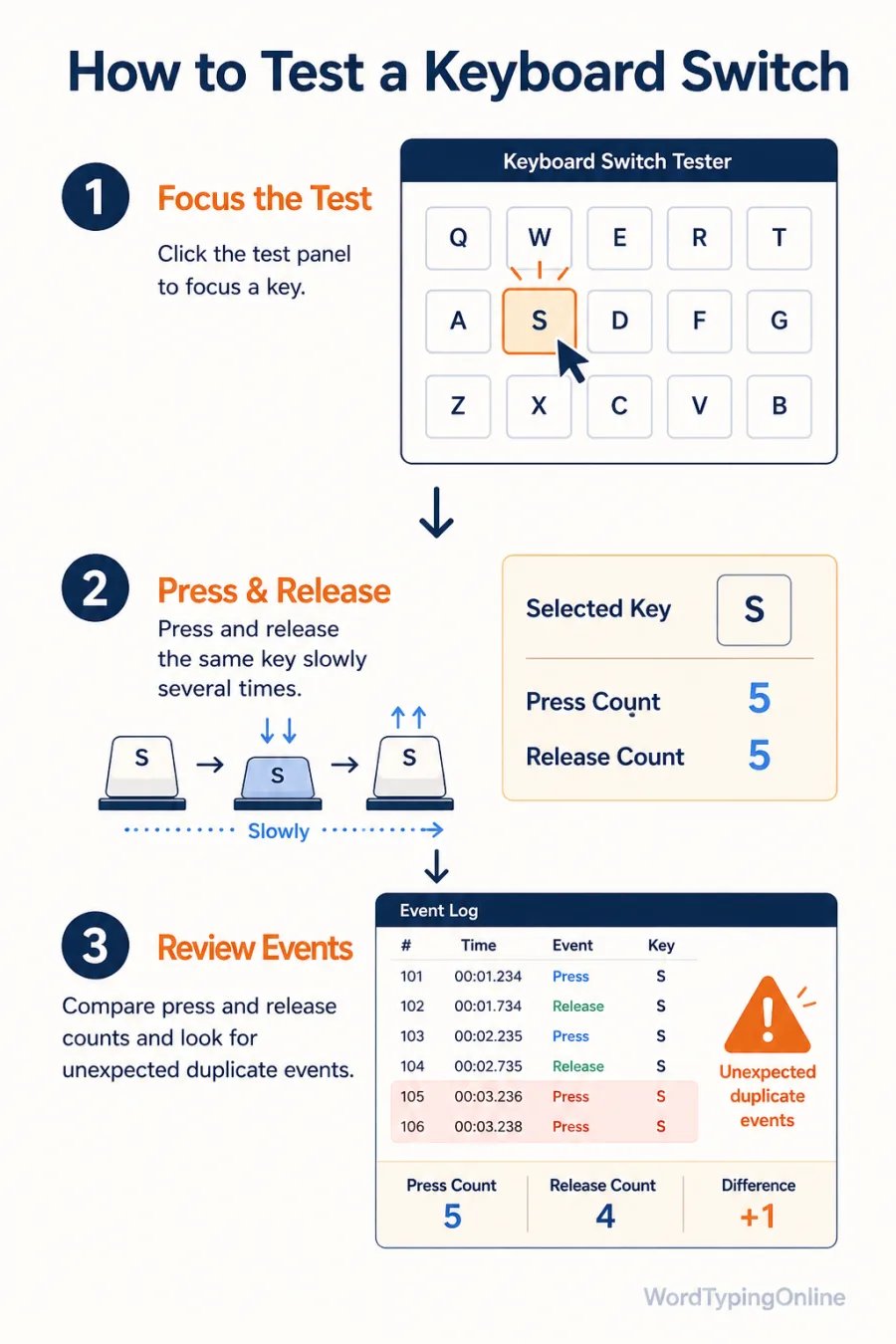
How to test a keyboard switch at a glance?
What it can show?
Press and release counts, recent local events, a last-key record, and potential rapid duplicate press patterns.
What it cannot confirm?
Exact switch travel, spring force, raw electrical bounce, or whether a keyboard needs repair. Test again on another device before deciding.
Who should use this tool?
Mechanical-keyboard owners, gamers, writers, students, and technicians can use it to examine a troublesome key after cleaning, swapping, or reconnecting a keyboard.
How to test a switch reliably?
Click the test panel and press the same key slowly several times. A deliberate single press should normally produce one press and one release event. Repeat the check at different speeds, then compare results under the same browser and connection conditions.
Common switch issues and next steps
Unexpected duplicate events can suggest chatter, while missing events can suggest debris, connection trouble, or a worn switch. Check the whole keyboard with the Keyboard Counter and use the Polling Rate Test when repeated-event timing is relevant.
Turn a healthy keyboard into better typing
Once keys feel dependable, build technique in typing lessons, develop rhythm with typing practice, and establish a real baseline on the typing speed test. For game-based repetition, try Balloon Burst or Word Memory.
Frequently asked questions
Can this test mechanical keyboard switches?
Yes. It records browser events from any physical keyboard, including mechanical keyboards.
Can it prove a switch is faulty?
No. It can show suspicious event patterns, but hardware diagnosis may require testing another device.
What is switch chatter?
Chatter is an unintended extra registration from what should be one key press.
Why should I press slowly?
Deliberate presses make unexpected duplicate events easier to identify.
Does the tool save my key data?
No. Events remain local unless you export your own report.
Can I test laptop keys?
Yes, provided the browser receives their keyboard events.
What should I do after testing?
Test typing speed and practise accuracy once your keyboard is behaving consistently.
Ready to test your typing speed?
Confirm your keyboard is ready, then turn reliable key input into faster, more accurate typing through focused practice and engaging games.
Test your typing speed · Start typing practice · Try typing lessons · Play typing games