
Typing game · Recall trainer
Word Memory Typing Game
Study a word, let it disappear, then type it from memory before the clock runs out.
Ready to remember?
WORDLook closely — the word will hide.Ready to play?
Remember, then type
Each card reveals a word for a short moment. Recall it correctly to build your score.
Memory round complete!
Escape pauses or resumes the game. Correct memories unlock faster levels. Reach the Top 50 to submit your name for public review.
Community scores
Word Memory leaderboard
Approved scores only. Select a level to see its Top 10.
Build recall and accurate typing with Word Memory
Word Memory is a free typing memory game that asks you to look closely, remember a short set of words, and then type the same words from memory. It turns keyboard practice into a focused recall challenge: you must recognise spelling, hold the sequence in your mind, and enter it accurately before time runs out. Use it as a quick warm-up before a typing test, after a targeted typing practice drill, or alongside structured typing lessons.
Unlike a standard word typing test, this game gives attention and working memory an important role. That makes each round useful for students, families, teachers, and adults who want a calmer way to improve keyboard confidence. You can play immediately in a browser, then continue with another short challenge from the typing games collection.
What is Word Memory Typing Game?
Word Memory Typing Game is an educational keyboard game built around short word sequences. A card briefly reveals the words you need to remember. When the words disappear, type the set in the same order to score points, protect your lives, and grow your combo. The challenge is simple to understand but rewarding to repeat because it combines spelling, visual attention, recall, and controlled typing.
How does Word Memory work?
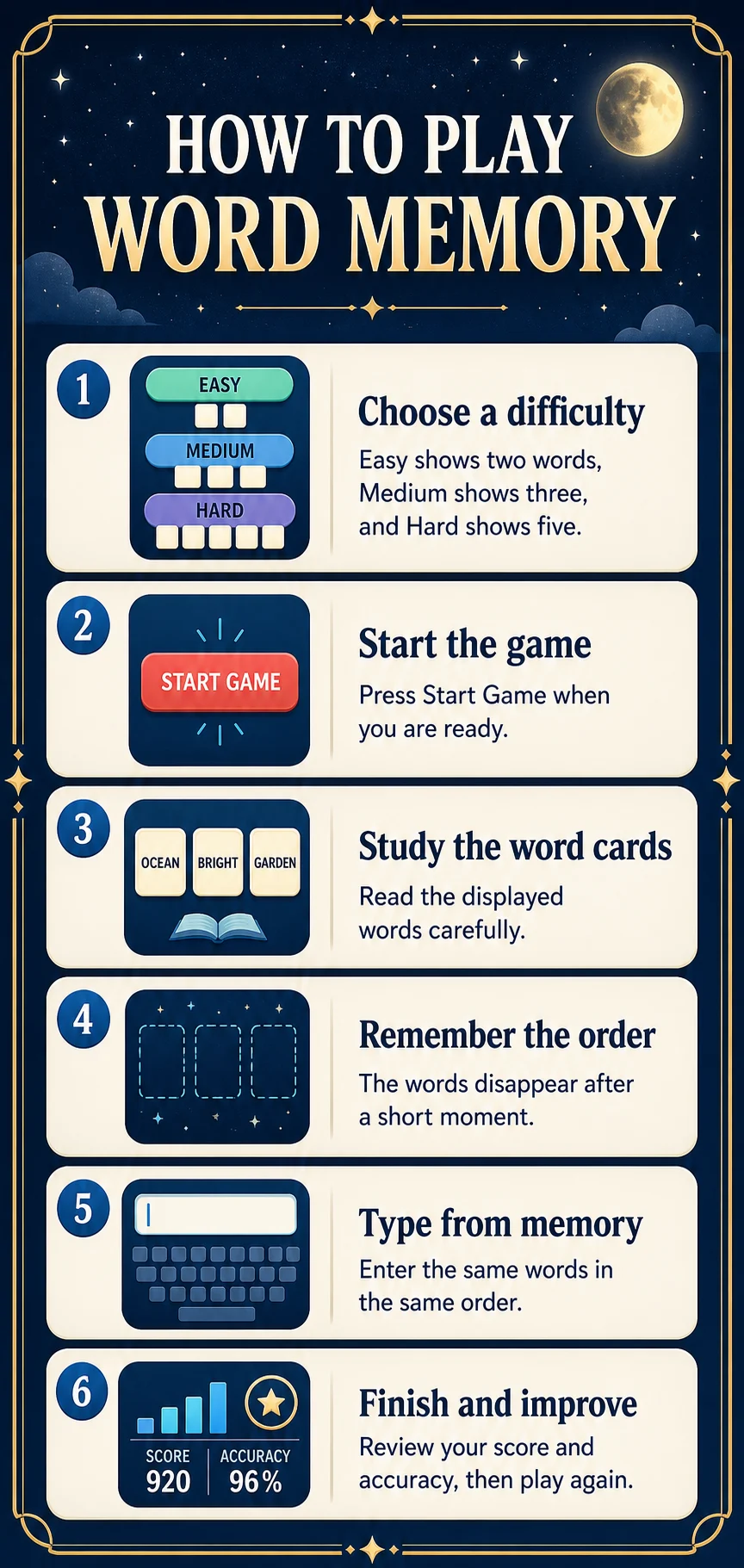
- Choose Easy, Medium, or Hard mode.
- Study the word set while it is visible on the memory card.
- Wait for the words to hide, then type the complete sequence from memory.
- Select Check word or press Enter to submit your answer.
- Use correct rounds to build your score, combo, and level before the timer ends.
Word Memory at a glance
Why choose Word Memory for typing practice?
- It connects word recognition with real keyboard input instead of passive memorisation.
- Short rounds make it easy to practise during a study break, classroom activity, or family challenge.
- Lives and a combo reward accurate typing rather than random key presses.
- Each difficulty mode gives beginners and confident typists a useful next step.
- It adds variety to regular typing practice while still strengthening practical word skills.
Who should play this typing memory game?
Word Memory works well for children learning common words, K–5 learners developing keyboard confidence, teens practising spelling under a little pressure, and adults refreshing touch-typing habits. Teachers can use a round as a brief bell-ringer or transition activity, while parents can offer it as a light screen-time activity with a clear learning goal. A physical keyboard is ideal on desktop, laptop, or tablet, and supported mobile keyboards can be used for shorter rounds.
Difficulty modes, lives, and progression
Easy mode reveals two words, helping new players learn the rhythm of looking, remembering, and typing. Medium mode increases the set to three words. Hard mode shows five words, giving experienced players a more demanding recall and accuracy challenge. Each missed answer can cost a life, while consecutive correct answers improve your combo and help you move through levels. Start where you can stay accurate, then increase the difficulty only when the current sequence feels comfortable.
How does this game help you improve?
- Improve typing accuracy: every character and word order matters when you enter a remembered set.
- Strengthen spelling recall: you practise holding common words in mind before typing them.
- Build muscle memory: repeated, correct word entries reinforce useful finger patterns.
- Develop focus: the reveal-and-hide rhythm encourages players to look carefully before acting.
- Prepare for longer typing: calm, accurate word recall supports stronger performance in a typing practice session or timed test.
Tips for remembering and typing word sets
- Read the whole set once before you begin typing; do not rush the first key.
- Notice the order of the words as well as their spelling.
- Say the words quietly in your head to create a simple memory pattern.
- Keep your hands relaxed and return to familiar key positions between rounds.
- Use Easy mode to establish accurate habits, then challenge yourself with Medium or Hard.
- Compare your own score and accuracy over time instead of chasing a single lucky round.
Leaderboard, devices, and browsers
Strong scores can qualify for review, and approved results appear on the Word Memory leaderboard for the selected difficulty. You can play as a guest, while an account helps keep your broader progress together. The game supports modern versions of Chrome, Edge, Firefox, Safari, and similar browsers on desktop, laptop, tablet, and phone. For a different recall-and-reaction challenge, try Letter Rain or visit the typing leaderboards to see community results.
Frequently asked questions
Is Word Memory Typing Game free?
Yes. You can play Word Memory free in a supported web browser.
How do I play Word Memory?
Study the displayed word set, wait for it to hide, then type the same words in the same order.
What do Easy, Medium, and Hard modes change?
Easy shows two words, Medium shows three, and Hard shows five words to remember.
Does this game help typing accuracy?
Yes. It rewards correct spelling, correct word order, and deliberate keystrokes.
Can children play Word Memory?
Yes. Easy mode is designed to be approachable for children and beginning typists.
Can I play on a phone or tablet?
Yes, in supported mobile browsers. A physical keyboard provides the most comfortable experience when available.
Do I need an account to play?
No. Guests can play immediately; an account saves progress and provides other features.
How does the Word Memory leaderboard work?
Qualifying scores can be submitted for review. Approved scores are shown publicly for the selected difficulty.
Ready to test your typing memory?
Play a Word Memory round, then choose the next typing challenge that matches your current goal.
Play Word Memory · Explore all typing games · Try typing practice · Build skills with lessons