
Typing game · Cosmic mission
Space Typing Shooter Game
Type the alien words to fire your laser and protect the galaxy.
Ready for launch?
Defend the stars
Type each alien word to blast it before it reaches your ship.
Mission complete!
Escape pauses or resumes the mission. Alien fleets speed up every 15 seconds. Reach the Top 50 to submit your name for public review.
Community scores
Space Typing Shooter leaderboard
Approved scores only. Select a level to see its Top 10.
Defend the galaxy with accurate typing
Space Typing Shooter turns short typing practice into a fast arcade mission. Read each alien word, type it accurately, and send a laser toward the matching target before the fleet reaches your ship. It is a focused way to practise quick recognition, clean keystrokes, and calm reactions without needing to install anything. For a broader drill, try typing practice; for guided skill building, continue with typing lessons.
This free browser game works as a short warm-up before a typing test, a fun break between study sessions, or a confidence-building challenge for new typists. You can also explore more beginner-friendly activities in our typing games collection.
What is Space Typing Shooter?
Space Typing Shooter is an educational arcade typing game. Alien word cards appear across the screen, and your spaceship fires toward a target as you type. Correct letters build the attack, while completing a word clears its target and protects the galaxy. The simple objective makes the game suitable for students, home learners, teachers, and anyone who wants a more playful way to improve typing speed and accuracy.
How does Space Typing Shooter work?
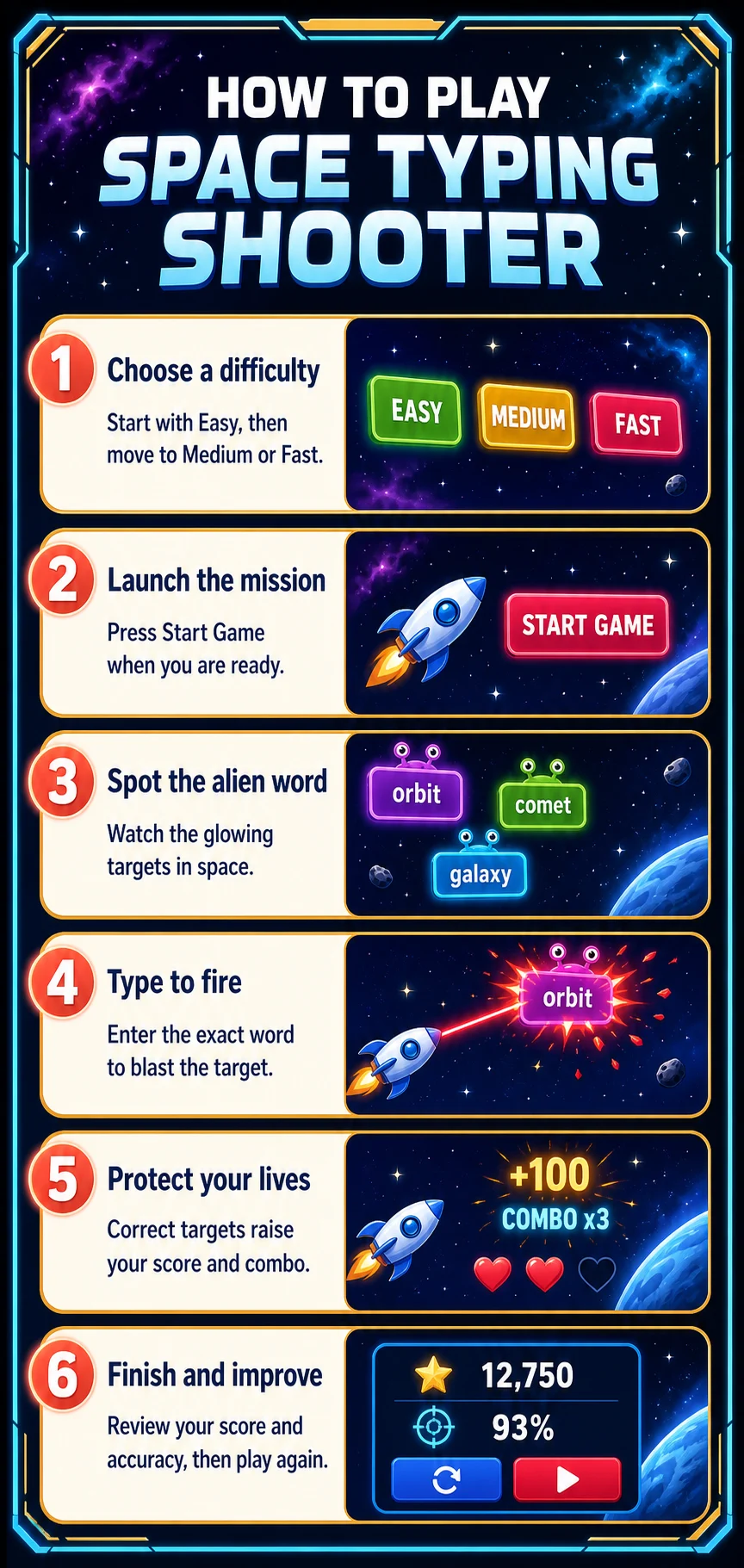
- Select Easy, Medium, or Fast mode.
- Start the mission and look for the alien word cards.
- Type the visible word carefully; the laser follows the target you are completing.
- Clear targets before they reach danger, protect your lives, and build a combo with accurate entries.
- Finish the round, review your score, and submit a qualifying result for leaderboard review.
Space Typing Shooter at a glance
Why choose this space typing game?
- Immediate visual feedback makes every correct word feel rewarding.
- Short targets help beginners develop confidence without long blocks of text.
- Lives and combos encourage accuracy instead of random key pressing.
- Difficulty modes let you increase the challenge at your own pace.
- Each session can complement sentence drills, lessons, and a timed typing test.
Who should play?
This game is designed for children, K–5 learners, teens, adult beginners, and teachers looking for an engaging keyboard activity. It is especially useful when a learner finds ordinary word lists repetitive. A physical keyboard gives the clearest experience on desktop or tablet, while supported mobile browsers can also be used for short sessions.
Difficulty modes, lives, and progression
Easy mode gives learners more time to read and type each word. Medium increases the pace for regular practice, while Fast is for players ready to make quicker decisions under pressure. Your lives show how much room remains for missed targets, and your combo rewards a chain of accurate clears. Begin where you can stay accurate, then move up gradually rather than choosing the fastest setting too soon.
How does this game help you improve?
- Improve WPM: repeated short-word entries build a faster recognition-to-keystroke rhythm.
- Protect accuracy: clearing the correct target rewards careful spelling and controlled typing.
- Build muscle memory: familiar letters and common words reinforce efficient finger movement.
- Prepare for timed tests: the pressure of moving targets helps you stay composed when a timer is running.
- Track progress: replay a mode and compare your score, accuracy, and best combo over time.
Tips for a higher score
- Read the whole target before rushing into the first letter.
- Prioritise the lowest or nearest threat when several aliens are visible.
- Keep your hands relaxed; tense hands create more missed letters.
- Use Easy mode to establish accuracy, then practise Medium before trying Fast.
- Take a short break when your accuracy drops and return with a fresh focus.
Leaderboard, devices, and browsers
Top qualifying scores can be submitted for review, and approved results appear on the game leaderboard. Guests can play immediately, while an account helps you keep your wider progress in one place. Space Typing Shooter supports current versions of Chrome, Edge, Firefox, Safari, and other modern browsers on desktop, laptop, tablet, and phone. For another reaction-based challenge, try Letter Rain or visit the typing leaderboards.
Frequently asked questions
Is Space Typing Shooter free?
Yes. You can play Space Typing Shooter for free in a supported web browser.
How do I destroy an alien target?
Type the word shown on its card accurately. Your laser targets the word you are completing and clears it when the entry is finished.
Which mode should a beginner choose?
Start with Easy mode until you can keep a comfortable pace and protect your lives consistently.
Can this game improve typing speed?
It can help by practising quick word recognition, accurate keystrokes, and steady reactions in short rounds.
Can I play on a phone or tablet?
Yes, on supported mobile browsers. A physical keyboard is recommended whenever one is available.
What do lives and combos mean?
Lives show how many missed targets you can absorb, while a combo tracks consecutive accurate clears.
Do I need an account to play?
No. Guests can play immediately; an account adds saved progress and other account features.
How does the leaderboard work?
Qualifying scores can be submitted for review. Approved scores are shown publicly for the selected difficulty.
Ready to protect the galaxy?
Launch a Space Typing Shooter round, then use your score to choose the next typing challenge for your current goal.
Play Space Typing Shooter · Explore all typing games · Try typing practice · Build skills with lessons