
Typing game · Garden challenge
Whack-a-Mole Typing Game
Type the mole words before they duck back into their burrows.
Ready to type?
Whack the word moles
Type each mole word before it disappears. Correct letters make your hammer bounce.
Round complete!
Escape pauses or resumes the game. Moles pop faster every 15 seconds. Reach the Top 50 to submit your name for public review.
Community scores
Whack-a-Mole Typing leaderboard
Approved scores only. Select a level to see its Top 10.
Build faster reactions with Whack-a-Mole Typing
Whack-a-Mole Typing turns a familiar arcade idea into a quick keyboard practice game. Moles pop up from burrows with short words, and you type the matching word before it ducks back underground. Every accurate response rewards attention, spelling, and controlled finger movement. It is a playful way to practise common words before a typing test, alongside a focused typing practice session, or after working through typing lessons.
The game is free to play in your browser and works well as a short warm-up for students, teachers, families, and adult beginners. Instead of staring at a long word list, players scan the grass, recognise a word, and respond with purpose. Explore more short, beginner-friendly challenges in the typing games collection.
What is Whack-a-Mole Typing?
Whack-a-Mole Typing is an educational typing game based on the classic whack-a-mole format. A mole appears from a burrow carrying a word. Your job is not to click it: type the word exactly while it is visible. Correctly completed words clear the mole, add to your score, and help build a combo. If a mole ducks away before you finish, you lose an opportunity and should reset your attention for the next target.
How does this typing game work?
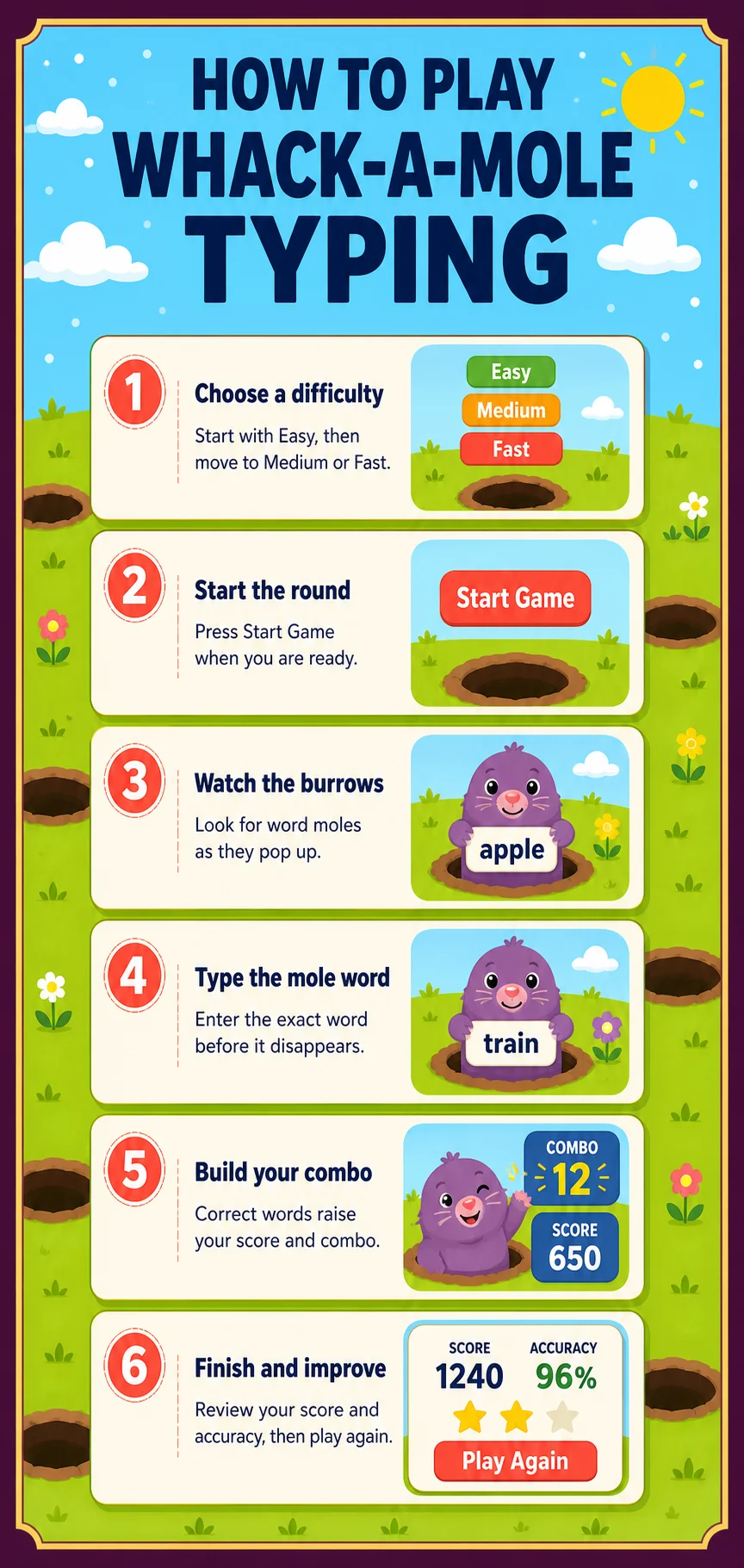
- Choose Easy, Medium, or Fast mode.
- Start the round and watch the grass for moles emerging from random burrows.
- Read the word on the active mole and type it accurately on your keyboard.
- Complete the word before the mole hides to score points and extend your combo.
- Protect your lives, finish the round, and review your score and accuracy.
Whack-a-Mole Typing at a glance
Why choose this typing practice game?
- Random burrows keep your eyes moving and prevent passive memorisation.
- Short words make the game approachable for beginners and younger learners.
- Lives and combos reward accurate typing instead of random key presses.
- Three difficulty modes make it simple to grow from calm practice into a faster challenge.
- Quick rounds fit naturally between homework, classroom activities, or longer keyboard drills.
Who should play Whack-a-Mole Typing?
This typing game is especially useful for K–5 learners, children starting keyboard practice, teens building confidence, and adults returning to touch typing. Teachers can use it as a short transition activity, while parents can use it as a screen-time option with a clear learning purpose. A physical keyboard provides the best experience on a desktop, laptop, or tablet; supported mobile keyboards can also be used for short rounds.
Difficulty levels, lives, and progression
Easy mode gives each mole more time on screen and is ideal for learning where letters are on the keyboard. Medium mode asks you to recognise and type words with a steadier rhythm. Fast mode raises the pace for players who can already type common words accurately. Lives show how many missed chances remain, while your combo celebrates consecutive correct words. Start with accuracy first, then increase the difficulty when your hands stay relaxed and your results remain consistent.
How does Whack-a-Mole Typing help you improve?
- Improve typing speed: short repeated entries help reduce the delay between seeing a word and typing it.
- Increase accuracy: each word must be spelt correctly before the mole disappears.
- Build muscle memory: familiar words reinforce practical finger patterns over many rounds.
- Strengthen focus: changing mole positions train visual attention and quick decision-making.
- Prepare for timed typing: a visible time limit helps players practise staying calm under gentle pressure.
Tips for a better high score
- Look at the full word before pressing the first key.
- Keep both hands in a comfortable home position instead of hunting for every letter.
- Do not chase every mole with rushed typing; protect accuracy and preserve lives.
- Use Easy mode until common words feel automatic, then move to Medium.
- Replay one mode and compare your score, accuracy, and combo rather than only chasing a single lucky result.
Leaderboard, devices, and browsers
Qualifying scores can be submitted for review, and approved results appear on the Whack-a-Mole Typing leaderboard for the selected difficulty. You can play as a guest, while an account helps keep your wider progress together. The game supports current Chrome, Edge, Firefox, Safari, and other modern browsers on desktop, laptop, tablet, and phone. For another quick-reaction challenge, try Letter Rain or compare your progress on the typing leaderboards.
Frequently asked questions
Is Whack-a-Mole Typing free?
Yes. You can play Whack-a-Mole Typing for free in a supported web browser.
How do I hit a mole?
Type the word shown on the mole accurately before it ducks back into its burrow.
Which difficulty should beginners choose?
Start with Easy mode, then move up when you can keep a relaxed pace and good accuracy.
Can this game improve typing accuracy?
Yes. The game rewards correct spelling, steady keystrokes, and careful word recognition.
What happens if I miss a mole?
The mole hides and you lose that scoring opportunity. Protect your remaining lives by focusing on the next word.
Can I play on a phone or tablet?
Yes, on supported mobile browsers. A physical keyboard is recommended whenever it is available.
Do I need an account to play?
No. Guests can play right away; an account saves progress and provides other features.
How does the leaderboard work?
Qualifying scores can be submitted for review. Approved scores are displayed publicly for the chosen difficulty.
Ready to pop up your typing skills?
Play a Whack-a-Mole Typing round, then use your score to choose the next typing challenge for your current goal.
Play Whack-a-Mole Typing · Explore all typing games · Try typing practice · Build skills with lessons