
Keyboard responsiveness check
Keyboard Polling Rate Test
Hold one key to measure its repeated browser events, estimate the event rate in Hz, and inspect timing stability.
Live key-event analysis
Hold one key to start measuring
For a steadier result, hold the same key for at least two seconds. More samples make the median interval more meaningful.
Recent timing samples
0 samples- Hold a key to collect local timing samples. Nothing is saved or transmitted.
What’s new in Keyboard Polling Rate Test?
Keyboard Polling Rate Test gives a browser-side repeat-event estimate, interval history, stability score, and local export tools. Start by checking that every key registers with Keyboard Tester, then compare browser feedback timing with the Keyboard Latency Test when responsiveness is your main concern.
What is a keyboard polling rate test?
This tool measures the timing between repeated keydown events while you hold a key, then calculates an event-rate estimate in Hz. Browsers cannot read a keyboard’s raw USB report stream, so the result is a transparent repeat-event measurement rather than a certification of advertised hardware polling.
Keyboard repeat rate at a glance
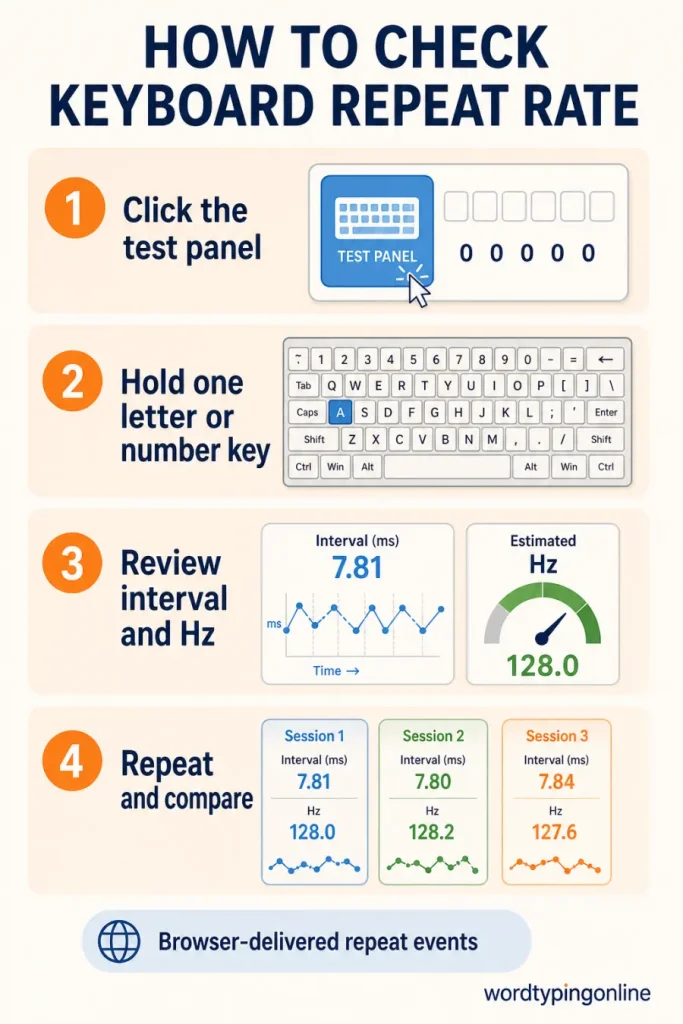
What the test shows?
Median interval, estimated repeated-event rate, timing stability, recent samples, and a local report you can copy, export, or print.
What changes the result?
Operating-system key repeat, browser scheduling, USB configuration, and system load all affect delivered events. Compare like-for-like sessions.
Who should use it and when?
Use it after changing keyboard settings, ports, drivers, or a browser. It is useful for students learning about input timing, gamers comparing setups, and professionals troubleshooting a keyboard that feels inconsistent. Take multiple short sessions rather than relying on one number.
How to get better results?
Click the panel, hold one letter or number key for two to five seconds, and review the median rather than a single interval. Avoid shortcuts and modifier keys. If the result changes greatly, close demanding applications and repeat under the same conditions.
From hardware checks to typing progress
Responsiveness matters most when it supports comfortable, accurate work. Follow typing lessons for technique, build consistency through typing practice, and measure your real pace on the WordTypingOnline typing speed test. For game-based repetition, try Turbo Type Rally, Falling Words, or Maze Word Defense.
Last updated: August 9, 2026 · Estimated time: 2–3 minutes · Best with a physical keyboard in a current browser.
Frequently asked questions
Can this test measure raw USB polling rate?
No. It measures repeated keyboard events delivered to the browser.
Why is my result lower than an advertised rate?
Operating-system repeat events are different from raw hardware reports.
Which key should I hold?
Use a letter or number key and avoid shortcuts.
How many samples are enough?
Hold one key for several seconds so the median can stabilise.
What does stability mean?
It shows how closely recent event intervals match each other.
Does the tool save my keys?
No. The session stays local unless you export your own report.
What should I use after this test?
Test speed on the homepage and practise accuracy with lessons and drills.
Ready to test your typing speed?
Turn a responsiveness check into practical progress by testing your speed, improving technique, and practising consistently with focused typing activities.
Test your typing speed · Start typing practice · Try typing lessons · Play typing games