
Typing game · Neon race
Turbo Type Rally
Type every checkpoint word to boost through the neon night race.
Ready to race?
Boost with words
Clear checkpoint words to race further down the highway.
Race complete!
Escape pauses or resumes the race. Checkpoints speed up every 15 seconds. Reach the Top 50 to submit your name for public review.
Community scores
Turbo Type Rally leaderboard
Approved scores only. Select a level to see its Top 10.
Race your way to faster typing
Turbo Type Rally is a free online typing race that turns each correct checkpoint word into forward momentum. It is made for learners who enjoy a clear goal, quick decisions, and friendly competition instead of a plain word list. Use it after a typing practice session, alongside typing lessons, or as a fun alternative to a timed typing test.
Your car shares the road with computer-controlled rivals. Read the active word, type it accurately, and build a combo to gain ground. The game is free to play in your browser, and you can explore more beginner-friendly challenges in our typing games collection.
What is new in Turbo Type Rally?
- Three difficulty modes let beginners start calmly before increasing the challenge.
- Computer rivals create a moving race rather than a static typing drill.
- Live time, score, lives, and combo feedback make each round easy to understand.
- Qualifying scores can be submitted for review for the public community leaderboard.
Who should use this game?
Students, job candidates, classroom learners, and casual players who want a more motivating way to practise keyboard speed can use Turbo Type Rally.
Estimated round time
About one minute per race. Repeat a few rounds to compare accuracy, pace, and your best combo.
How does Turbo Type Rally work?
The race begins with a checkpoint word. Type that word correctly to move your car forward, then prepare for the next checkpoint. Rival cars continue at their own pace, so fast and accurate typing matters more than simply pressing keys quickly. Incorrect attempts interrupt your rhythm, while correct answers help preserve your momentum and combo.
- Select Easy, Medium, or Fast mode.
- Start the race and watch the checkpoint word.
- Type the displayed word accurately to boost your car.
- Keep a steady rhythm while racing the computer opponents.
- Finish the round, review the result, and submit a qualifying score if it reaches the Top 50.
How to play Turbo Type Rally?
Start with Easy mode if you are building keyboard confidence. Look at the complete checkpoint word before typing it, keep your fingers relaxed, and let accuracy lead your speed. On desktop or tablet, a physical keyboard offers the most comfortable race experience. On phones, use the on-screen keyboard and keep the game area visible before you begin.
Use the pause control or Escape key when you need a break. Stopping a race ends the current attempt without saving a result, so use it only when you want to leave the round. When you are ready for a different skill focus, try our WPM calculator to understand your speed or return to typing practice for targeted drills.
Turbo Type Rally at a glance
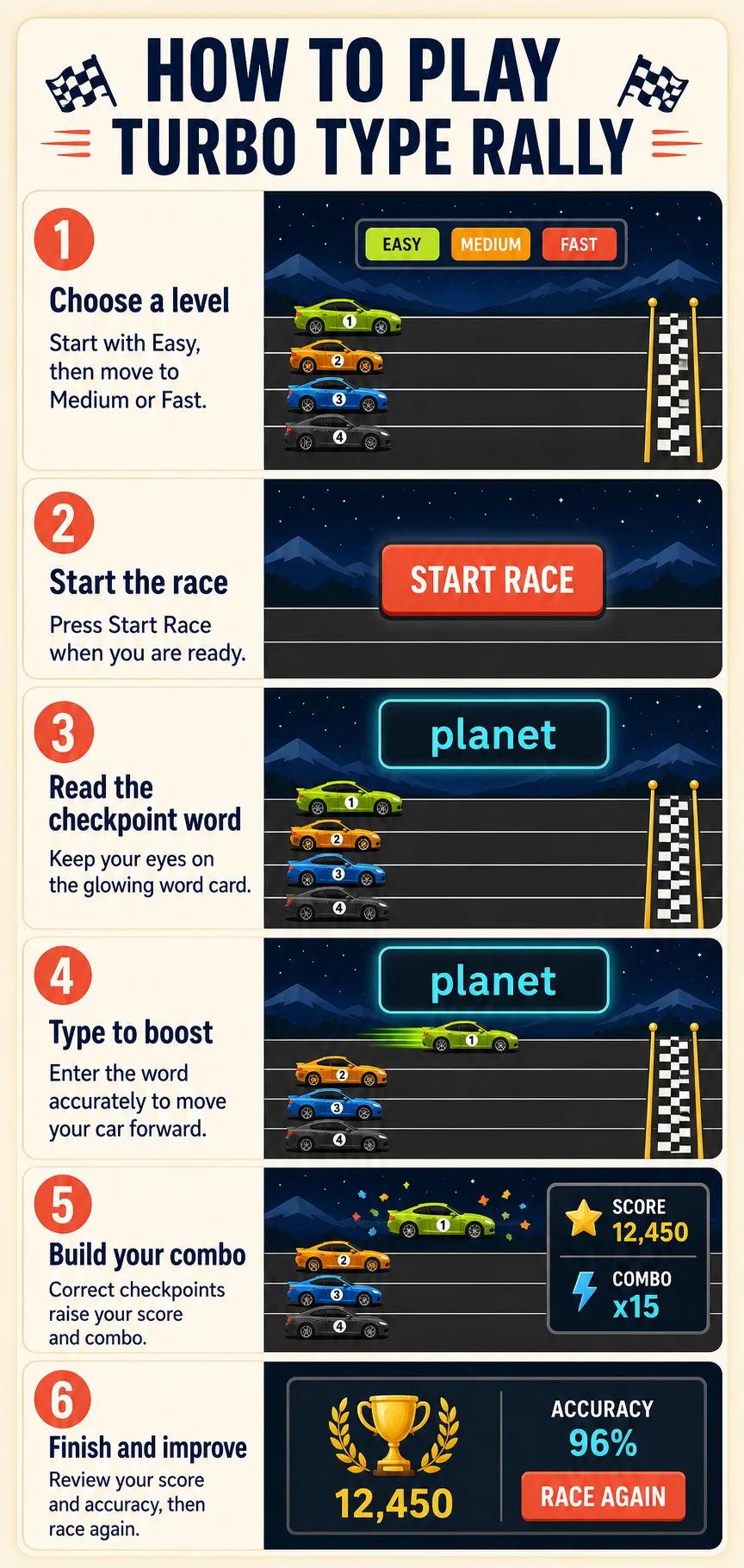
How this typing race helps you improve?
Improve WPM
Short checkpoint words encourage you to recognise familiar patterns and respond without hesitation.
Protect accuracy
Every correct word adds useful progress, making careful typing more rewarding than rushing through errors.
Build focus
Rivals and a finish line give each word a purpose, helping you stay engaged throughout the round.
Difficulty modes and race progression
Easy is best for first-time players and younger learners who want time to read each checkpoint. Medium suits players who can type common words comfortably and want a faster rhythm. Fast is for confident typists who want a more demanding race. Whichever mode you choose, your score, lives, and combo give a simple picture of how the round went.
A combo grows when you keep answering correctly. If your accuracy drops, slow down slightly, reset your hands, and focus on the next word rather than the finish line. This approach builds a repeatable typing habit that transfers well to schoolwork, data entry, and everyday computer use.
Tips for a better race
- Read the whole checkpoint word before pressing the first key.
- Keep your eyes on the word instead of watching every rival car.
- Prioritise correct words; a clean combo is more helpful than rushed, error-filled work.
- Use short, regular races to compare improvement over time.
- Move from Easy to Medium only when the slower mode feels controlled.
Compete with the community
Turbo Type Rally includes a Top 50 community score area for each difficulty level. If your result qualifies, enter a display name and submit it for review. Approved scores are publicly visible, helping keep the leaderboard useful and fair for everyone. You can also visit the main typing leaderboards to see broader community rankings.
Supported devices and browsers
Turbo Type Rally works in current versions of Chrome, Edge, Firefox, Safari, and other modern browsers. You can play on desktop, laptop, tablet, and supported mobile devices. For the clearest typing experience and the quickest response, use an updated browser and a reliable keyboard.
Frequently asked questions
Is Turbo Type Rally free to play?
Yes. Turbo Type Rally is free to play in a modern web browser.
How does Turbo Type Rally work?
You type checkpoint words to move your car forward while computer-controlled rivals race beside you.
Do I race against computer opponents?
Yes. The game includes computer rivals so each round feels like a simple typing race.
Which mode should beginners choose?
Start with Easy mode, then move up when you can complete races with controlled accuracy.
How do correct words move my car?
Each correctly typed checkpoint gives your car progress and helps build your combo.
Does Turbo Type Rally improve typing speed?
It can help you practise quicker word recognition, steady rhythm, and accurate responses in a focused format.
Can I play on a phone or tablet?
Yes, on supported mobile devices and browsers. A physical keyboard is usually more comfortable for longer practice.
How does the leaderboard work?
Top qualifying scores can be submitted for review. Approved scores appear in the relevant public leaderboard.
Do I need an account to play?
No. Guests can play immediately, while account features are available for users who want a more persistent experience.
Ready to race?
Start a Turbo Type Rally round, then continue building speed with a live test, focused practice, or guided lessons.
Start a free typing test · Explore typing practice · Try typing lessons · Discover more games