
Typing game · Maze mission
Maze Word Defense
Guide the dot runner through the maze and type the approaching word wisps to keep the paths clear.
Ready to explore?
Maze Word Defense
Use the arrow keys or on-screen arrows to turn the runner. Type each word wisp before it reaches you.
Mission complete!
Use arrow keys, swipe, or the controls to guide the runner. Type ghost words to clear them. Escape pauses or resumes the mission.
Community scores
Maze Word Defense leaderboard
Approved scores only. Select a level to see its Top 10.
Build focus and typing control with Maze Word Defense
Maze Word Defense is a free typing game that combines quick keyboard practice with a simple maze challenge. Guide your defender through the maze, type the words shown on approaching ghosts, and protect your route before they get too close. It is a useful way to practise letter recognition, word accuracy, and calm decision-making under light pressure.
Quick facts
- Estimated round: about 1 minute
- Focus: word recognition, accuracy, and reactions
- Works on desktop, tablet, and mobile
Who should play?
Maze Word Defense is suitable for K–5 learners, beginner typists, students, parents, teachers, and anyone who wants a focused typing game with a clear objective.
How Maze Word Defense works?
- Select Easy, Medium, or Fast before starting a round.
- Watch for word ghosts as they move through the maze.
- Type the matching word correctly to defeat the ghost.
- Correct words build your score and combo; missed targets can cost a life.
- As the round continues, the challenge becomes faster and rewards stronger focus.
Maze Word Defense at a glance
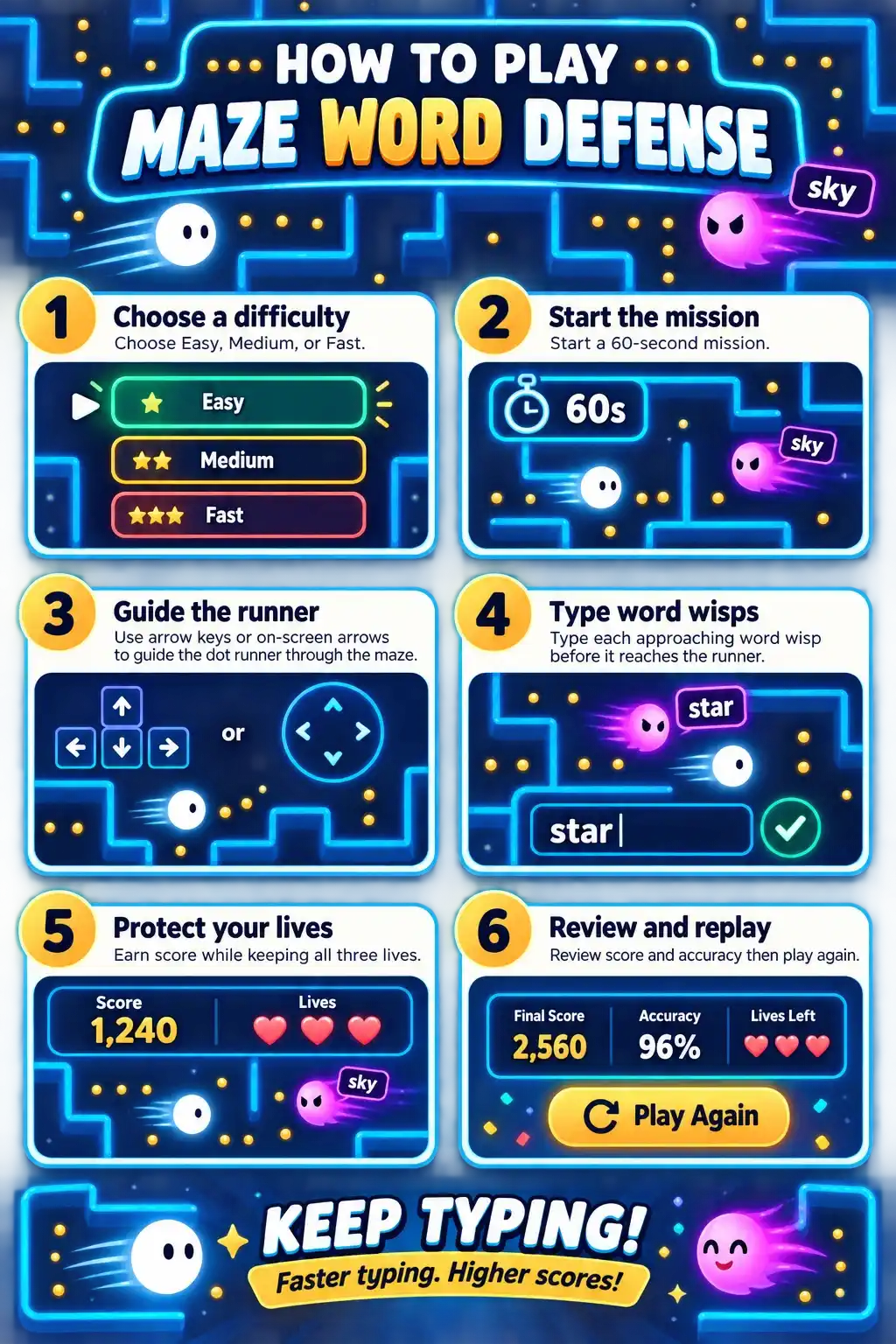
Levels, lives, and progression
Easy mode gives new players more time to find each word and become comfortable with the maze. Medium mode creates a steadier challenge for learners who already know the keyboard. Fast mode is designed for confident players who want to test quick recognition and accurate typing under pressure. Your lives make every decision matter, while a higher combo rewards consistent correct answers.
How does this game improve typing skills?
Improve accuracy
Each correct word connects what you see to the keys you press, helping you reduce avoidable mistakes.
Build concentration
The moving maze targets encourage learners to stay focused without making practice feel repetitive.
Develop keyboard confidence
Short rounds make it easy to repeat practice and build comfort with familiar letter patterns.
Tips to beat your high score
- Read the complete target word before starting to type.
- Choose accuracy first; a correct combo is more valuable than rushed mistakes.
- Keep your hands in a relaxed position and avoid looking down at the keyboard too often.
- Begin with Easy mode, then move to Medium or Fast when your accuracy stays strong.
- Use short repeat sessions to improve reactions without tiring your hands.
Why do learners, parents, and teachers like Maze Word Defense?
This typing game gives learners an approachable reason to practise. Children can focus on beating the next target, while parents and teachers can use short rounds as a fun keyboard warm-up. For a different kind of beginner challenge, try Letter Rain, build word recall with Word Memory, or use typing practice for a calmer session.
Supported devices and browsers
Maze Word Defense works in current versions of Chrome, Edge, Firefox, Safari, and other modern browsers. A physical keyboard gives the best experience on desktop and tablet. On supported phones and tablets, tap Start Game to activate the device keyboard, then keep the game visible while you type.
Frequently asked questions
Is Maze Word Defense free?
Yes. You can play Maze Word Defense free in a modern web browser.
What is the objective of Maze Word Defense?
Type the target words correctly before the approaching ghosts complete their route through the maze.
Which difficulty should beginners choose?
Easy mode is the best starting point because it gives more time to read and type each word accurately.
Does Maze Word Defense help typing speed?
It can help improve recognition speed, focus, and accuracy. Practise regularly, then move to faster modes when you are ready.
Can I play on a phone or tablet?
Yes. The game supports mobile and tablet devices with compatible on-screen keyboards.
What happens if I miss a word?
A missed target can cost a life. Use the result screen to review your score and start another round.
Can I save a high score?
If your score qualifies for the Top 50, you can submit a display name for administrator review.
Ready to defend the maze?
Start with a short Maze Word Defense round, then strengthen your skills with focused practice, guided lessons, and more typing games.
Start a free typing test · Explore typing practice · Try typing lessons · Browse all typing games