
Keyboard diagnostic
Keyboard Tester
Press any key to check that it registers. Your activity stays in this browser.
Live keyboard check
Press keys to test your keyboard
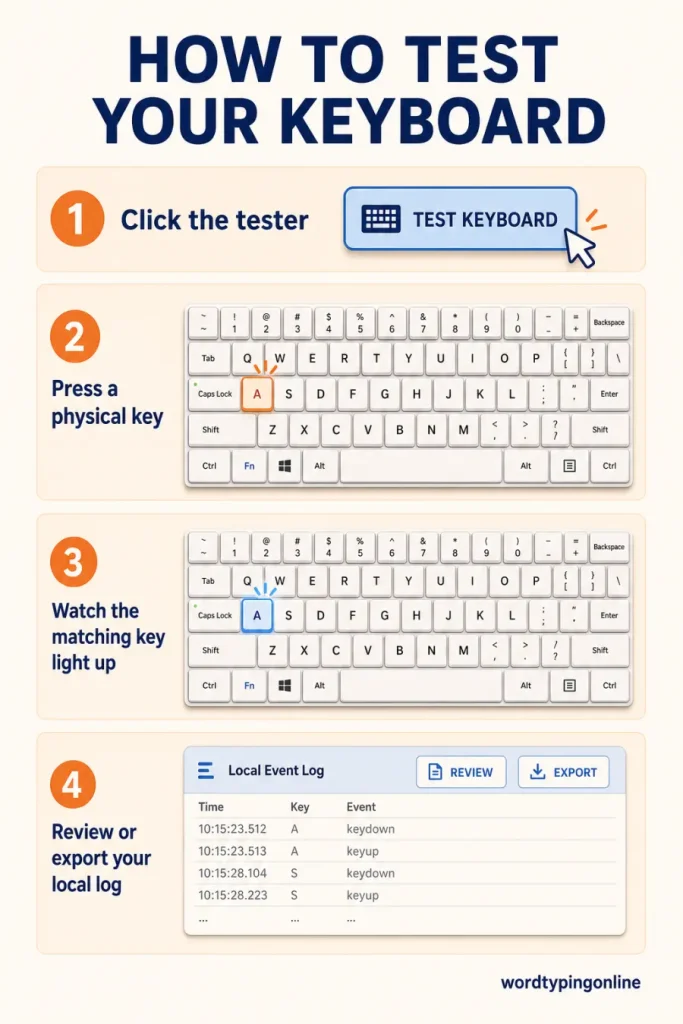
Click the panel, then press any key. Pressed keys light up above and are added to the local event log.
Recent key events
0 events- Key events will appear here. This tool does not save or send what you press.
What’s new in Keyboard Tester?
Keyboard Tester gives you a focused, private way to check whether your browser receives each key press. The live keyboard highlights the key, while the session panel records the last key, browser key code, total presses, and unique keys tested. Use the log when a key feels unreliable after reconnecting a keyboard, changing a USB port, or cleaning a switch.
What is an online keyboard tester?
An online keyboard tester confirms that a keyboard event reaches the browser. It is a useful first diagnostic, but it cannot prove the condition of every switch or measure raw electrical response. When a key registers normally here, take the practical next step with a typing speed test; real words and sentences are the best way to confirm that a keyboard feels dependable.
Keyboard Tester at a glance
Keyboard Tester checks
Key registration, browser key code, repeated events, total presses, and unique keys. The local event log can be copied, printed, or exported for your own troubleshooting.
Keyboard Tester does not check
Switch force, raw USB polling, operating-system shortcuts handled before the browser, or the full cause of a hardware fault. Use results as evidence, not a repair diagnosis.
Who should use this tool?
Students preparing for typing lessons, teachers checking classroom keyboards, writers, office workers, gamers, and anyone testing a new keyboard can use it. It is beginner-friendly: click the panel, press a key, and watch the matching key light up. Advanced users can compare the event log after changing a connection or device.
How to get reliable results?
Test one key at a time, avoid browser shortcuts, and repeat a missing key on another port or computer. If a key repeats unexpectedly, release it and check whether repeat events stop. For timing questions, use the Keyboard Polling Rate Test; for browser feedback timing, use the Keyboard Latency Test.
Improve after the check
A healthy keyboard supports consistent practice. Build accuracy through typing lessons, then develop rhythm in typing practice. For lighter repetition, try Balloon Burst, Falling Words, or Turbo Type Rally. These games encourage fast recognition while keeping practice engaging.
Last updated: August 9, 2026 · Estimated time: 1–3 minutes · Works best in current Chrome, Edge, Firefox, or Safari with a physical keyboard.
Frequently asked questions
Does Keyboard Tester save what I type?
No. Events stay in the current browser session unless you choose to export your own log.
What should I do if a key does not register?
Reconnect the keyboard, try another port or device, and check for debris before deciding it needs repair.
Can I test a phone or tablet keyboard?
The page is responsive, but a physical keyboard provides the most complete check.
Why does a key repeat in the event log?
Operating systems normally repeat a held key after a short delay. If repeats continue after release, test the key again and inspect the keyboard connection.
What does the key code mean?
The key code identifies the physical keyboard location recognised by the browser. It can help distinguish keys with similar labels.
Can this diagnose a broken keyboard switch?
It can show whether an event reaches the browser, but it cannot confirm every mechanical or electrical cause. Compare results on another device if possible.
Can I export the result?
Yes. The tool offers copy, text download, CSV export, and print actions for the local event log.
Ready to test your typing speed?
Confirm your keyboard is ready, then measure real typing speed and build reliable accuracy through focused practice, lessons, and enjoyable games.
Test your typing speed · Start typing practice · Try typing lessons · Play typing games